Selling bulk bakery ingredients to home bakers and small bakery businesses means your buyers don’t shop like retail customers. They order across multiple pack sizes in one session, they have minimum thresholds, and they need to communicate delivery and labeling preferences upfront. A standard Shopify product page doesn’t handle any of that cleanly. But a bulk order form, per-variant MOQ rules, and a few product options fields will. Maya’s store is a good example of what that looks like in practice.
She sells flours, extracts, sprinkles, gel colors, and fondant, all available in pack sizes ranging from trial quantities to wholesale bags. Her catalogue is solid. Her customers know what they want. But her inbox tells a different story. Messages like “can I get both the 2kg and 5kg bread flour in one order?” and “what’s the minimum I need to buy on the 500g almond flour?” arrive daily. Her product page can’t answer those questions on its own, so her customers ask her directly instead. The demand to sell bakery ingredients in bulk is clearly there. The store just isn’t set up for it.
So, how does she do it?
- Home bakers and small bakery businesses buy bulk bakery ingredients differently from retail shoppers. They stock multiple pack sizes in one order and have minimum thresholds below which an order isn’t worth placing.
- Shopify’s standard retail product page doesn’t give mixed B2C/B2B buyers a ready-made bulk ordering experience across variants by default.
- MultiVariants replaces the default dropdown with a bulk order form so buyers can select quantities across all pack sizes in one view.
- Per-variant MOQ rules let you set different minimums for different pack sizes, a minimum of 3 on a 500g trial bag, minimum 1 on a 5kg sack, cleanly and without custom code.
- Product options let you collect wholesale-specific inputs like delivery instructions, labeling preferences, and purchase reference numbers directly on the product page.
Table of Contents
Why Bulk Ingredient Buyers Don’t Shop Like Retail Customers
A home baker stocking up for the month doesn’t behave like someone buying a single bag of flour from a supermarket. They’re thinking in production terms.
- They might want a 1kg bag of rice flour to test a new gluten-free recipe alongside a 5kg bag of bread flour for their regular weekly bake.
- A small bakery business restocking for the week wants the 10kg sack of cake flour and two 500g bottles of vanilla extract, all in one clean order.
These are wholesale baking supply buyers. They have minimum thresholds. Ordering a single 500g trial bag and paying shipping on it doesn’t make sense for them or for you packing it. They also have operational preferences, labeling requirements, delivery window requests, purchase reference numbers for their own bookkeeping.
A retail-style product page doesn’t account for any of this. Customers end up emailing to ask about pack size combinations, placing incomplete orders, or skipping the store entirely and calling in. For a supplier trying to scale, it’s a backlog.
What Shopify’s Standard Setup Doesn’t Cover for Ingredient Suppliers
Shopify handles the storefront well, but its standard retail product page wasn’t designed around wholesale baking supply buyers ordering across multiple pack sizes. Two gaps show up quickly.
- No ready-made bulk quantity input across pack sizes. Shopify’s standard product page usually doesn’t give retail or mixed B2C/B2B buyers a bulk order table across variants. Shopify B2B does have a Quick order list option that lets customers add multiple variants to cart from a single view, but it depends on B2B setup, compatible theme support, and custom code added to theme files. Stores using older or custom themes may need theme updates or Liquid/JavaScript changes. For a mixed buyer base that includes retail home bakers alongside small business accounts, it’s not a straightforward out-of-the-box experience.
- Per-variant MOQ requires B2B configuration. Shopify B2B catalogs support variant-level quantity rules, including minimum, maximum, and increment settings per variant. But accessing this requires a B2B catalog setup and compatible theme support. Some storefront customization options may also depend on the merchant’s plan and whether the store uses Shopify Markets. For suppliers serving a mixed audience of home bakers and small businesses, not all of whom are company-profile B2B accounts, the native setup can still leave gaps in how those rules surface and apply cleanly across the storefront.
Shopify bulk ordering can feel limited when buyers need to order across multiple variants, pack sizes, or quantity rules. For wholesale baking supply scenarios, making that experience work smoothly often takes more setup than most ingredient suppliers expect.
How MultiVariants Handles This for a Bulk Ingredient Store
MultiVariants addresses the ordering layer directly, not the pricing or account management behind it, but the actual interaction a buyer has on the product page. It works for mixed buyer bases without requiring a full B2B catalog configuration for every customer.
For a bulk bakery ingredients store, it does three things.
- It replaces the default dropdown with a bulk order form that shows all pack sizes at once. So, a buyer can enter quantities across 500g, 1kg, 2kg, 5kg, and 10kg in one view before hitting Add to Cart.
- It automatically shows an out-of-stock badge at the variant level on that same grid, so buyers know which sizes are available before they start entering quantities, without selecting each size individually.
- And through its product options feature, it lets you collect the wholesale-specific inputs that business buyers need to include with an order, without requiring them to follow up by email.
Setting It Up: A Bulk Bakery Ingredients Store Walkthrough
Here’s how Maya sets this up for her bread flour product, which comes in six pack sizes: 500g, 1kg, 2kg, 5kg, 10kg, and 25kg.
Step#1 Install MultiVariants on Your Shopify Store
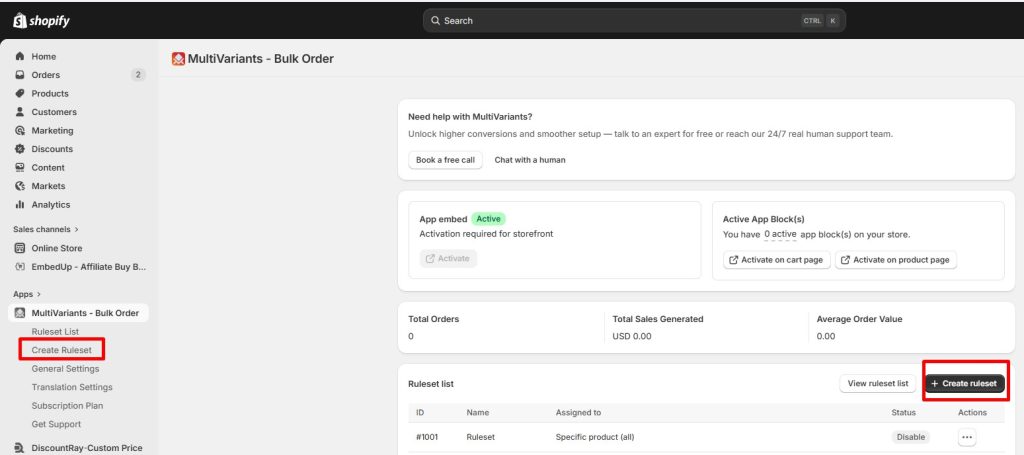
Go to the Shopify App Store and install MultiVariants. Once installed, you’ll land in the app dashboard where you can create a new ruleset.
Step#2 Name the Ruleset and Select the Product
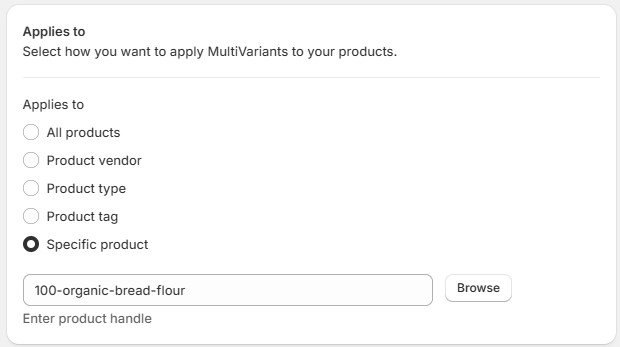
Add a title for the ruleset, something like “Bulk Flour Order”. Then select the product it applies to. MultiVariants lets you apply rulesets to individual products, product types, tags, product vendor, or your full catalogue, so you can roll this out across all your wholesale baking supplies without rebuilding from scratch each time.
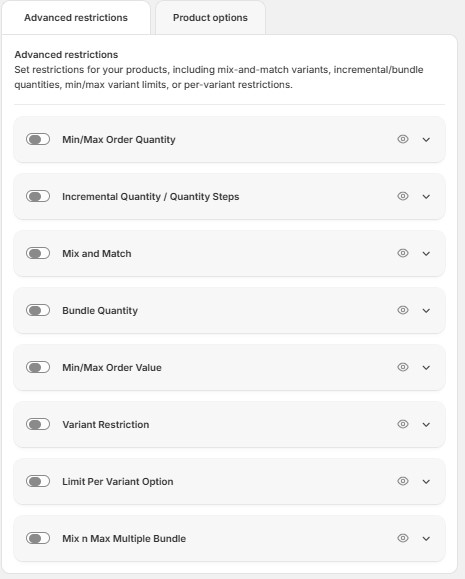
Step#3 Set Advance Restrictions if You Want
Multivariants offers a total of 8 restrictions. You can choose any one you need. You’ll see an option for demo products with each restriction. Check those to understand better.
Step#4 Add Product Options
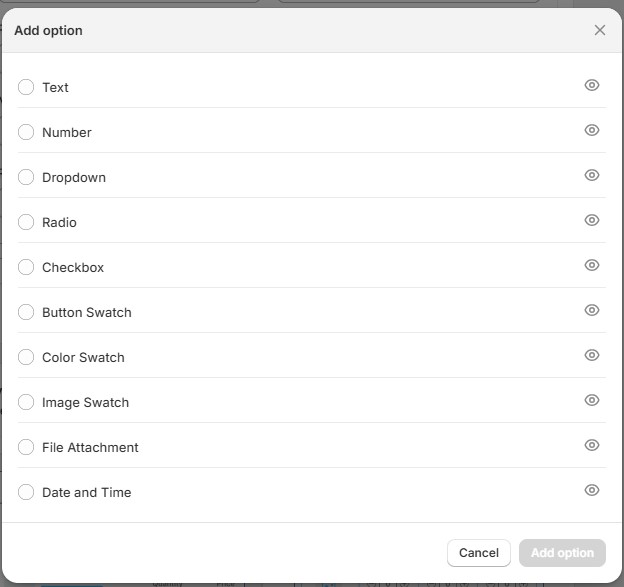
Using MultiVariants’ product options feature, Maya adds three fields to the product page:
- A text field for delivery instructions (“leave at side entrance,” “call before delivery”)
- A text field for a purchase reference number, which small bakery businesses often need for their own bookkeeping
These details arrive with the order. Maya doesn’t have to follow up by email to collect them, and her wholesale buyers don’t have to remember to include them in a separate message.
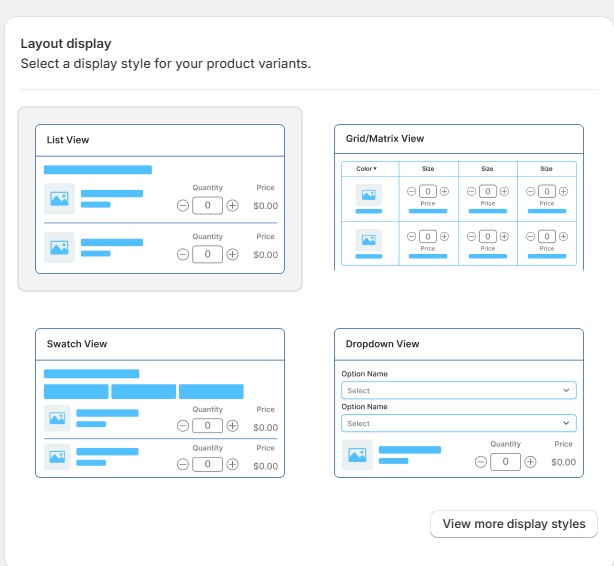
Step#5 Choose the Layout
Select the bulk order form layout. This replaces the dropdown with a structured table where buyers can see all six pack sizes and enter quantities across them in one step.
What Her Customers See
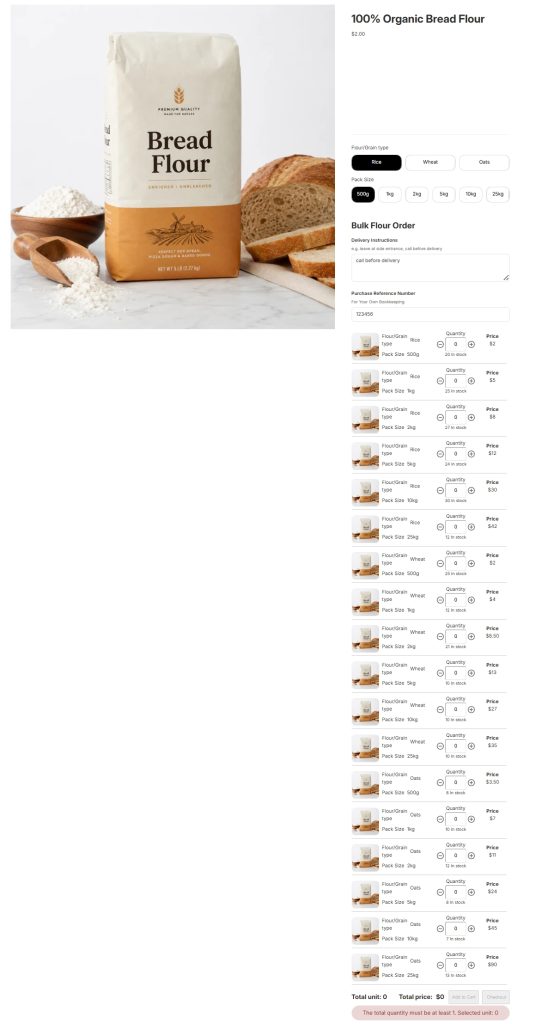
The product page shows all variants in one view, each with a quantity selector, live stock status, and price. The two additional option fields sit clearly above the variant grid. Since no products have been added yet, the Add to Cart and Checkout buttons are inactive.
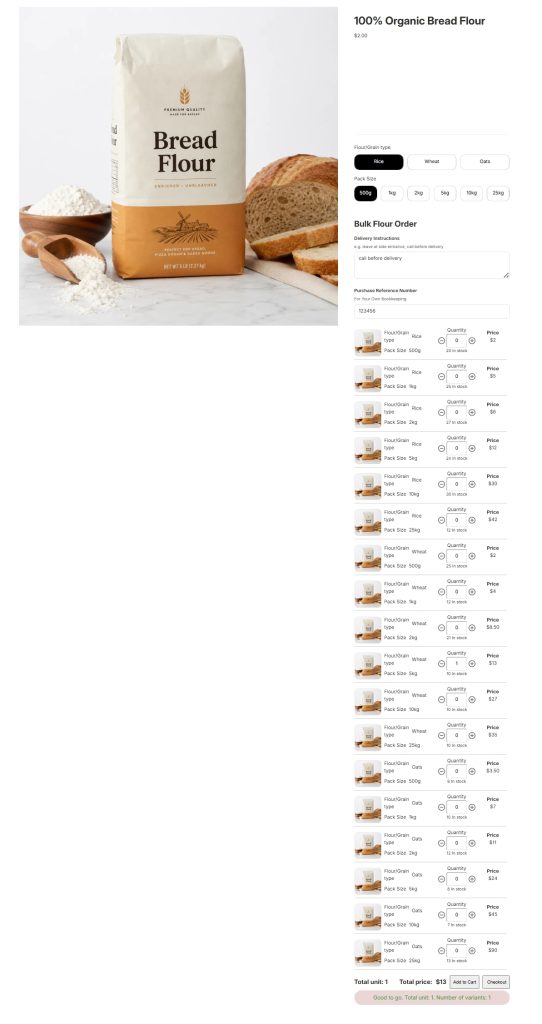
Once a buyer selects a pack size and enters a quantity, both buttons activate. If you have restrictions set, the buttons stay inactive until the buyer meets the required conditions. The restrictions hold at both the cart and checkout stages.
Any pack size that’s out of stock gets an automatic badge directly on the grid. Maya doesn’t have to update anything manually when a size runs low. The badge appears on its own as soon as stock hits zero, and disappears again once she restocks.
For a buyer building a restock order across six sizes, that’s the difference between a clean ordering experience and an email asking whether the 10kg sack is still available.
What Changes for the Ingredient Supplier
Once this setup is live, the ordering experience shifts in a way Maya feels immediately. The back-and-forth emails about pack size availability drop off because buyers can see stock status across all sizes on the same screen where they’re placing the order. Buyers who previously emailed to confirm whether a size was in stock before committing to a restock can now see it at a glance and order without any friction. And the operational details that used to arrive in a separate message, delivery instructions, labeling preferences, reference numbers, come through with the order itself.
The product page stops looking like a retail store that happens to sell wholesale baking supplies and starts looking like it was built for a business buyer. That change is small on the surface. But for a buyer placing a regular monthly restock, a store that understands how they buy is one they come back to.
Conclusion
Selling bulk bakery ingredients to home bakers and small bakery businesses is a different operation from running a retail food store. The buyers are different, their order behavior is different, and the things they need to communicate before checkout are different.
A bulk order form gives wholesale baking supply buyers a clear, structured surface to order across pack sizes without the back-and-forth. Per-variant MOQ rules protect the supplier’s packing economics without manual enforcement, and work across both retail and business buyers on the same storefront. Product options capture the delivery and labeling details that wholesale buyers carry into every order. Together, they make a Shopify store that actually matches how bulk bakery ingredient buyers buy — and that’s what turns a one-time order into a regular account.
Sell Bulk Bakery Ingredients on Shopify: FAQ
Can I set different minimum order quantities for different pack sizes on Shopify?
On a standard Shopify retail product page, per-variant MOQ is not available as a simple default setting. Shopify B2B catalogs can support variant-level quantity rules, but merchants may still need compatible theme support, a B2B catalog configuration, or an app like MultiVariants to create a clean bulk ordering experience that works for mixed buyer types.
What’s the difference between a bulk order form and Shopify’s default product page for ingredient suppliers?
Shopify’s default product page shows one variant at a time through a dropdown. A buyer has to select a pack size, add it to the cart, navigate back, and repeat for each size. A bulk order form shows all pack sizes simultaneously, letting a buyer enter quantities across the entire range in a single interaction before adding to cart.
Can I collect labeling or delivery instructions before checkout?
Yes, through MultiVariants’ product options feature. You can add text fields, dropdowns, and other input types directly to the product page so buyers submit their delivery instructions, labeling preferences, or purchase reference numbers as part of the order, rather than in a separate follow-up message.
Does MultiVariants work for stores selling across multiple ingredient categories?
Yes. You can apply rulesets across your full catalogue by product type or tag, which means you can roll out bulk order forms and MOQ rules across flours, extracts, decorating supplies, and other wholesale baking supplies without setting up each product individually.

Syeda Rehnoma Tanzom
This article was reviewed by the MultiVariants Technical Support Team, who regularly helps Shopify merchants test bulk ordering setup, variant selection, quantity rules, cart behavior, and checkout validation issues.