Shopify B2B ordering mistakes usually start quietly. A merchant opens wholesale without changing anything on their storefront, shares a link with a bulk buyer, and hopes the experience is good enough. It almost never is. According to Baymard Institute, the average cart abandonment rate across eCommerce is 70.22%. For wholesale buyers dealing with clunky variant selection, unclear pricing, and missing quantity rules, that number is likely worse.
Wholesale buyers are not like retail shoppers. They return often. They order large quantities across multiple variants. They expect professional ordering flows, not a retail storefront with a discount code attached. When the experience fails them, they do not leave a complaint. They simply stop ordering and find a supplier who makes the process easier. This guide covers the ten most common B2B setup mistakes on Shopify and exactly how to fix each one before they start costing you orders.
- Shopify B2B ordering mistakes can quietly reduce wholesale orders and buyer trust.
- Missing MOQ rules, quantity limits, and bulk order layouts create friction for wholesale buyers.
- Retail-style dropdowns make it harder for B2B customers to order multiple variants quickly.
- Manual discount codes can cause pricing errors, shared codes, and checkout confusion.
- MultiVariants and DiscountRay help fix the ordering and pricing gaps in Shopify B2B stores.
Table of Contents
Why Do Shopify B2B Ordering Mistakes Become So Expensive?
Small setup gaps become expensive when wholesale order sizes are large. A missing MOQ rule lets a retail shopper order a single unit at a wholesale price. A broken order form pushes a buyer toward your support inbox instead of your checkout.
Shopify B2B ordering mistakes also damage trust. A wholesale buyer expects a professional ordering system, not a retail page with hidden rules that only appear at checkout. The first clunky experience is often the last one they give you.
The ten mistakes below cover the most common failure points we have seen across wholesale Shopify setups.
10 Most Common Shopify B2B Ordering Mistakes
Mistake 1: No Minimum Order Quantity Rules
One of the most expensive Shopify B2B ordering mistakes is launching wholesale pricing without minimum order quantity enforcement. When there is no MOQ rule in place, retail shoppers can order a single unit at your wholesale price, and they will.
This is how to set minimum order quantity for Shopify B2B stores correctly. You need rules that operate at the product level, the variant level, or the cart level, depending on how your catalog is structured. A skincare brand selling wholesale toners might need a minimum of 12 units per variant. An apparel brand typically requires a minimum of one full-size run before a wholesale order qualifies.
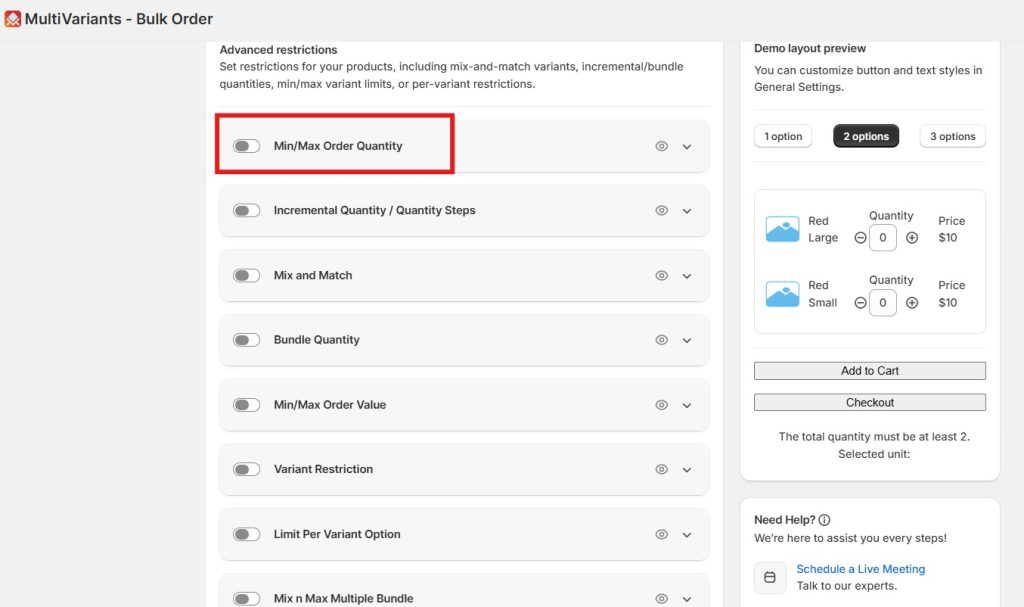
MultiVariants supports minimum and maximum quantity rules directly from the product page. Buyers see the rules clearly before they add items to the cart, which reduces checkout confusion and support tickets simultaneously.
Mistake 2: Using Retail Dropdowns for Wholesale Buyers
Shopify wholesale ordering problems often start with the product page itself. The default Shopify variant dropdown is designed for a retail shopper buying one item in one size. A wholesale buyer ordering 12 colors across 6 sizes using that same dropdown is a buyer who is about to abandon.
This is the core problem with how most merchants set up their wholesale storefront. The buyer cannot see the full product matrix. They cannot select multiple variants in one flow. They have to go back and forth through the same dropdown for every single combination they need.
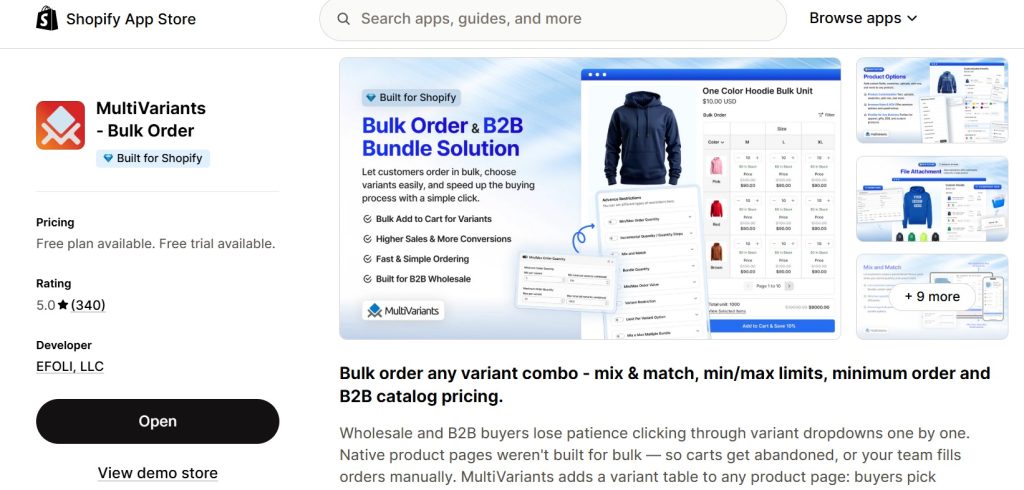
A variant table or bulk order layout removes this friction entirely. MultiVariants converts the standard product page into a matrix view where buyers can see all variants at once, enter quantities across multiple options, and add everything to cart in a single action.
Mistake 3: Ignoring Shopify B2B Order Form Best Practices
A wholesale page should help buyers order faster. Every extra click, every unclear label, every missing piece of information is a reason for a bulk buyer to slow down or stop.
Shopify B2B order form best practices focus on three things. Speed, clarity, and confidence. The buyer should be able to see every available variant, understand the pricing for each quantity level, and know the stock status before they commit.
The fewer decisions a buyer has to make outside your product page, the better. If they need to email you to confirm a color is in stock before placing an order, you have already lost momentum. MultiVariants helps here by showing live inventory per variant directly on the ordering interface.
Mistake 4: Checkout Friction That Kills B2B Orders
Another serious Shopify B2B ordering mistakes pattern is ignoring what happens after the buyer adds to the cart. B2B buyers may abandon at the cart page when pricing changes unexpectedly, when quantity rules fire an error they did not anticipate, or when the checkout flow looks and feels like a retail experience.
This explains why B2B customers abandon Shopify checkout even after showing strong buying intent. The product selection works. The cart breaks. That sequence is more common than most merchants realize because wholesale setup is tested from the merchant’s side, not the buyer’s side.
The fix is to test the complete path as a buyer. Test the product page. Test the cart drawer. Test the cart page. Test the checkout. Test the order confirmation. Every step where a wholesale buyer encounters something unexpected is a step where you lose orders.
Mistake 5: No Dedicated Shopify Minimum Order Quantity App
Many merchants try to handle MOQ rules manually, using product descriptions and honor-system policies. This approach fails as soon as your catalog grows or your buyer list expands.
A Shopify minimum order quantity app handles this automatically so buyers cannot bypass the rules even accidentally. This matters most when MOQ depends on specific variants, buyer tags, or wholesale account types rather than a single flat number across the whole store.
MultiVariants connects MOQ rules directly to the variant selection experience. When a buyer selects variants from the product matrix, the quantity rules are already visible in the interface, not buried in a policy page they may never read.
Mistake 6: Missing Cart Quantity Limits for Wholesale
Setting a minimum order is only half the rule. Missing maximum quantity limits is a different kind of problem, and it is especially expensive for merchants with limited stock, seasonal inventory, or allocated wholesale quantities.
Shopify cart quantity limits for wholesale prevent one buyer from claiming more stock than their allocation allows. This matters most for apparel stores running seasonal colorways, supplement brands managing batch sizes, and bakery or food brands with production limits per order cycle.
The rule here is simple. If your inventory can be exhausted by a single over-ordering wholesale buyer, you need a maximum quantity rule in place before that scenario happens.
Mistake 7: Treating All Wholesale Buyers the Same Way
One of the most common mistakes when selling wholesale on Shopify is applying identical rules, pricing, and copy to every buyer. A gym chain ordering 500 units monthly has different expectations than a boutique studio ordering 30 units quarterly.
Wholesale buyers care about different things. Case pack sizes. Lead times. Reorder minimums. Payment terms. Volume pricing tiers. When your wholesale storefront answers none of these questions directly, buyers fill the gaps with support emails, and your team pays the operational cost of that gap.
A proper B2B setup addresses these questions on the product page, in the checkout flow, and in the post-order communication before the buyer has to ask.
Mistake 8: Building the Store Before Testing It as a Buyer
Shopify B2B store setup mistakes to avoid almost always include one specific failure. The merchant builds the wholesale setup, checks that the settings look right in the admin, and sends buyers to a page they have never actually ordered from themselves.
Wrong pricing visibility is one of the most damaging outcomes of skipping this step. Retail buyers stumble onto wholesale pricing. Wholesale buyers get shown a retail price at checkout after the catalog price led them to expect something different. Either outcome damages trust immediately.
Before sending any wholesale traffic to your store, complete a full test order as a wholesale buyer. Use a real test account with the correct customer tag or company assignment. Go through every step from the product page to the order confirmation and check every price, rule, and message along the way.
Mistake 9: Using Manual Discount Codes for B2B Pricing
How to fix Shopify B2B pricing visibility issues is a question most merchants answer with a workaround. They create a wholesale discount code, share it privately, and trust buyers to use it correctly every time. This breaks in multiple ways.
Codes get shared outside the intended audience. Buyers forget to apply them. The code does not stack correctly with shipping rules or product exclusions. And when something goes wrong, the merchant discovers it by looking at a completed order with the wrong discount applied.
DiscountRay solves this by replacing the code-sharing model with automatic discount logic. B2B pricing applies to the right buyer at the right time based on customer segment, company account, or cart conditions, with no manual steps required from either the buyer or the merchant.
Mistake 10: No Clear Quantity Rules for Bulk Orders
Shopify quantity rules for bulk orders should be planned around the specific structure of your catalog. A bakery supplying wholesale accounts might require box increments of 12 or 24. An apparel brand might require a full-size run before a color can be ordered. A supplement brand might require case quantities of 6 or 12 units.
Without these rules, bulk buyers make errors. They order quantities that cannot be fulfilled. They under-order and require manual adjustments. They over-order and request partial refunds. Every one of those scenarios creates support work that could have been avoided with a clearly enforced quantity rule on the product page.
Shopify B2B ordering mistakes at the quantity level are among the most preventable issues in wholesale setup. They just require deliberate planning before the store goes live.
Quick Pre-Launch Checklist for Shopify B2B Stores
Before sending any wholesale traffic to your store, run through these checks.
Confirm minimum order quantity rules are active and visible on the product page. Confirm maximum quantity limits are in place for any inventory-constrained products. Test the full order flow as a buyer using a real company account or a correctly tagged customer. Check that wholesale pricing applies automatically and does not require a code. Confirm that retail customers cannot access or trigger wholesale pricing. Review the checkout flow for any messaging that does not match the wholesale buyer context.
Shopify B2B ordering mistakes are almost always preventable with a structured pre-launch review rather than a reactive fix after orders start arriving.
Wrapping Up
Shopify B2B ordering mistakes are almost always preventable. Most come from a storefront that was built for retail buyers and then opened to wholesale without rebuilding the buying journey around what a bulk buyer actually needs. The ten mistakes in this guide cover the most common failure points, and each one has a practical fix that can be implemented before the problem affects real orders.
Before scaling wholesale traffic, test every step of your buying flow as a buyer. A smoother B2B setup saves support time, protects your margins, and gives wholesale buyers the confidence to place larger orders with less friction every time they come back.
FAQs
What are the most common B2B ordering mistakes on Shopify?
The most common Shopify B2B ordering mistakes include missing minimum order quantity rules, using retail dropdowns for bulk variant selection, incorrect pricing visibility, missing maximum quantity limits, manual discount codes instead of automatic B2B pricing, and checkout flows that were never tested from a wholesale buyer’s perspective.
How do I set a minimum order quantity for wholesale customers on Shopify?
Use a dedicated app like MultiVariants to enforce MOQ rules at the product, variant, or cart level. Native Shopify settings do not support granular MOQ enforcement tied to specific variants or buyer types. Always test the rule by completing a full test order as a wholesale buyer before going live.
Why are my Shopify B2B customers abandoning the cart?
B2B cart abandonment on Shopify usually happens because bulk variant selection is too slow, pricing changes unexpectedly at checkout, quantity rules fire errors buyers did not anticipate, or the checkout flow feels like a retail experience that does not match the wholesale relationship.
How do I prevent retail customers from placing wholesale orders on Shopify?
Use customer tags, company accounts, catalog-based pricing, or gated wholesale pages to restrict access. Also, enforce minimum order quantity rules so single-unit retail orders cannot be placed at wholesale prices even if a buyer accesses the wholesale page without authorization.
What apps help fix B2B ordering issues on Shopify?
MultiVariants handles bulk variant ordering, product matrix display, and minimum and maximum quantity rules. DiscountRay handles automatic B2B pricing, tiered discounts, and customer-segment-based offers without requiring discount codes at checkout.