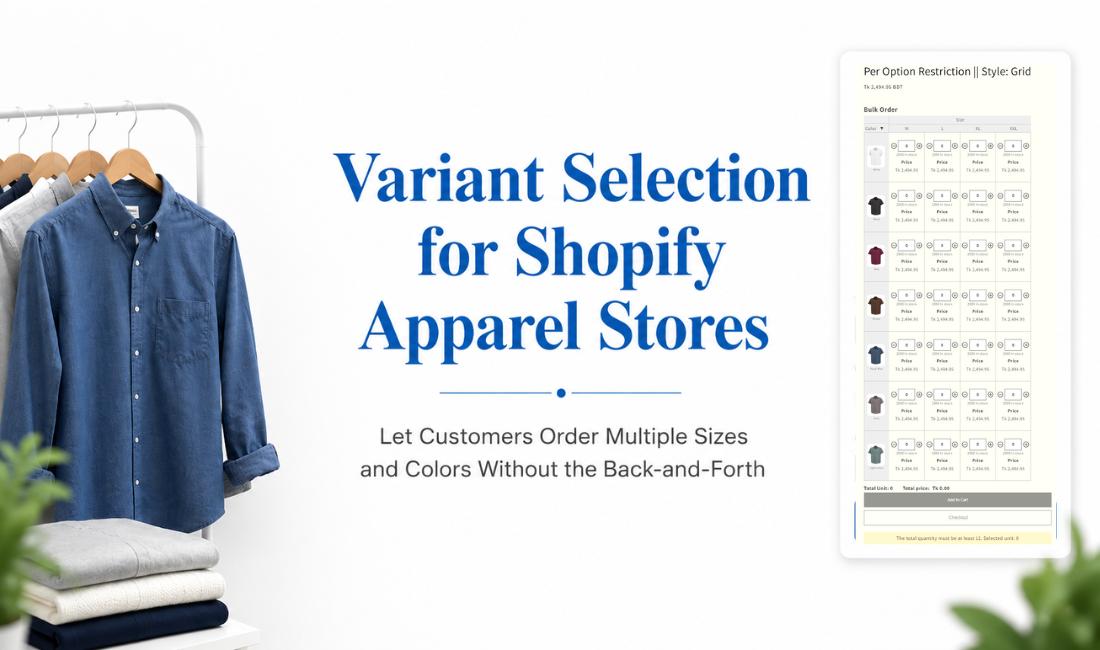
If you sell apparel on Shopify and your customers regularly buy more than one size or color of the same product, variant selection for apparel is probably the most underrated problem on your product page. Shopify’s standard product page handles single-variant purchases cleanly, but the moment a customer wants two medium blacks, one large white, and one small red from the same tee, the experience falls apart. They select a variant, add to cart, go back, select again, repeat. For a wholesale buyer placing a color-run order across ten SKUs, that process is genuinely painful. This blog covers how to fix it.
- Shopify’s standard product page usually makes customers select one variant combination at a time, which creates real friction for apparel stores where multi-size, multi-color orders are common.
- A variant table displays all sizes and colors in one view, letting customers fill in quantities across variants and add everything to cart in a single action.
- Per-variant minimums enforce a quantity floor on each individual variant, so a customer choosing red and black must meet the minimum for each color separately, not across the order as a whole.
- Custom product options sit alongside the variant table on the same product page, handling personalisation fields like monogramming, logo uploads, or custom print colors that go beyond Shopify’s native three-option limit.
- Together, these features give apparel merchants a cleaner ordering experience for both DTC customers buying family packs and wholesale buyers placing color-run orders.
Table of Contents
Why Variant Selection for Apparel is Different From Other Product Types
Most product categories have a simple relationship with variants. A customer picks a size, or picks a color, and they’re done. Apparel doesn’t work that way.
A parent buying school uniforms needs three different sizes. A boutique retailer placing a wholesale order needs a minimum of each colorway. A customer buying basics (tees, hoodies, socks) for a household is almost always ordering across sizes in a single session. These aren’t edge cases for apparel stores; they’re the norm.
The challenge isn’t just that customers want multiple variants. It’s that they want to see all their options at once, make their selections in one place, and move to checkout without navigating back and forth. Flexible variant ordering isn’t a nice-to-have for apparel; it’s what the product page needs to do its job.
Shopify’s default variant selector updates the product page when a customer makes a selection, which works well for a single-variant purchase. For apparel merchants whose customers routinely order across sizes and colors, it creates unnecessary steps that cost conversions.
What Shopify’s Native Variant Setup Can and Can’t Do
It’s worth being clear about what Shopify gives you natively before talking about what sits on top of it.
Each product on Shopify can have up to three options, such as size, color, and style. Shopify’s standard product page usually makes customers select one variant combination at a time before adding it to cart. For a single-variant purchase, that works. For bulk order apparel on Shopify where a customer is ordering across four sizes and three colors, that’s up to twelve separate add-to-cart actions.
Shopify B2B catalogs now support quantity rules and volume pricing, but Shopify’s standard product page still does not give apparel buyers a built-in variant table where they can enter quantities across multiple size and color combinations in one view. For merchants selling to both retail and wholesale customers through a standard storefront, that gap is real.
These aren’t problems that affect every store. For apparel merchants dealing with multi-variant orders outside of a dedicated B2B catalog setup, they are the problem.
How a Variant Table Changes the Apparel Ordering Experience
A variant table replaces the dropdown-by-dropdown selection flow with a single view of all variants, laid out as a grid. Sizes run across the top, colors down the side (or vice versa), and customers enter quantities directly into the cells that match what they want. One view, one add-to-cart action.
For a tee available in five colors and four sizes, that’s twenty possible variant combinations visible at once. A customer can see the full range, decide on their quantities, and complete the order without leaving the product page.
MultiVariants gives merchants control over how that table displays. The layout options include list, grid, dropdown, and swatch formats, so the visual presentation can match the store’s design rather than defaulting to a generic table. Out-of-stock variants are flagged with badges directly in the table, so customers aren’t selecting combinations that can’t be fulfilled.
For wholesale buyers, the variant table maps directly to how they think about ordering: a color run, a size assortment, or a specific ratio of units across SKUs. The table makes that kind of structured ordering possible without any back-and-forth, which is a meaningful part of why mix and match variant ordering drives higher engagement and order values for apparel stores specifically.
Per-Variant Minimums: Giving Apparel Merchants Real Order Control
Per-variant minimums are one of the more specific features in this space, and they’re worth explaining clearly because they work differently from a standard order minimum.
When a merchant sets a per-variant minimum of two, a customer choosing red and black must buy at least two red and at least two black. They cannot order one red and one black to satisfy a total order minimum of two. The minimum applies to each variant the customer selects, independently.
For DTC apparel merchants selling value packs or multi-packs, this prevents customers from cherry-picking a single unit from a bundle-priced product. For wholesale apparel merchants, it enforces colorway minimums that reflect actual fulfillment and production constraints. A retailer ordering a new colorway at one unit doesn’t make commercial sense for most wholesale operations; per-variant minimum quantity enforcement makes that boundary automatic rather than something the merchant has to police manually.
While Shopify B2B catalogs support quantity rules for B2B-specific ordering, the per-variant minimum in MultiVariants applies directly on the standard product page variant table, covering both DTC and wholesale merchant setups without requiring a separate B2B catalog configuration. The minimum is set per product rather than requiring individual configuration per variant, which keeps setup practical.
Custom Product Options Alongside Variant Selection for Apparel
The variant table handles size and color, which are the core Shopify variants a merchant sets up when creating a product. But apparel frequently needs more than three options, and that’s where Shopify’s native limit creates a real constraint.
Each product on Shopify can have up to three options. For a basic tee in multiple sizes and colors, three options is usually enough. For a uniform supplier adding an embroidery field, a made-to-order brand collecting measurements, or a basics brand offering monogramming, three options runs out fast.
MultiVariants’ custom product options remove that ceiling entirely. Merchants can add unlimited custom fields to any product page, and these sit alongside the variant table rather than replacing it. The variant table continues to handle size and color ordering. The product options layer handles everything additional: a text field for a name or monogram, a color swatch for a custom print color, a file attachment for a logo upload, a date field for personalized delivery.
The option types available cover most apparel personalisation use cases:
- Text for names, monograms, or custom instructions
- Color swatch or image swatch for custom print or embroidery color selection
- File attachment for logo uploads on uniform or branded merchandise orders
- Dropdown or radio button for fit preference or finish selection
- Date and time for personalised or made-to-order delivery scheduling
A merchant can configure whichever combination fits their product without needing a separate app to handle the personalisation layer.
Putting It Together: A Flexible Setup of Variant Selection for Apparel Stores
When these features work together on a single product page, the ordering experience changes meaningfully for both customer types this blog is written for.
A DTC customer buying tees for a family sees all sizes and colors in a single variant table, fills in quantities across the combinations they want, and checks out in one action. If the merchant sells personalised tees, the product options fields for name or print color sit directly below the table, captured in the same add-to-cart flow.
A wholesale buyer placing a bulk order for apparel on Shopify sees the same table, but now has per-variant minimums enforcing the colorway floors the merchant needs. They cannot order one unit of a new color to test it if the minimum is four. The constraint is built into the product page, not communicated separately after checkout.
Neither setup requires custom development. Both run from the same app, on the same product page, without separate tools for the variant table, the minimums, and the options layer.
Conclusion
Variant selection for apparel is a genuine product page problem, and the solution isn’t complicated once the right pieces are in place. The variant table solves the display and ordering friction for customers buying across multiple sizes and colors. Per-variant minimums give merchants control over how individual colorways or sizes are ordered, which matters differently for DTC pack sellers and wholesale merchants but matters to both. MultiVariants’ custom product options extend the product page past Shopify’s native three-option limit, covering personalisation needs that are common in apparel without requiring a separate tool.
For DTC apparel merchants whose customers buy multiples, and for wholesale apparel merchants who need structured ordering with minimum enforcement, these three features address the specific shape of the problem. MultiVariants handles all three on the same product page.
FAQ: Variant Selection For Apparel Stores
Can Shopify show all product variants on one page without an app?
Shopify displays variants on the product page natively through dropdown menus or swatches that require customers to make one selection at a time. A full variant table layout showing all size and color combinations simultaneously, with inline quantity inputs, requires a third-party app.
What is a per-variant minimum and how does it work for apparel?
A per-variant minimum sets a quantity floor on each individual variant a customer selects, not on the order as a whole. If the minimum is two and a customer selects both red and black, they must order at least two red and at least two black separately; combining one of each does not satisfy the minimum.
Can I set different minimum quantities for different variants on the same product?
MultiVariants applies the per-variant minimum at the product level, meaning all variants on that product share the same minimum value. If you need different minimums across different products, each product is configured independently.
Does adding custom product options affect how the variant table displays?
No. Custom product options and the variant table coexist on the same product page without interfering with each other. The variant table handles the core Shopify variants (size, color), and the product options fields appear as additional inputs for personalisation or extra information.
Is this setup suitable for wholesale apparel ordering on Shopify?
Yes. The variant table maps well to how wholesale buyers think about ordering across a color run or size assortment, and per-variant minimums give merchants the colorway floor enforcement that most wholesale operations need. For merchants already using Shopify B2B catalog quantity rules, MultiVariants extends the same kind of control to standard storefront product pages without a separate catalog setup.

Syeda Rehnoma Tanzom
This article was reviewed by the MultiVariants Technical Support Team, who regularly helps Shopify merchants test bulk ordering setup, variant selection, quantity rules, cart behavior, and checkout validation issues.