If you thought that after the April 2026 B2B update Shopify bulk ordering would get easier, you’re not alone in feeling let down. The update was real and meaningful: better B2B pricing tools, company profiles, and custom catalogs are now available across all paid plans. But if you went back to your product page expecting a faster, cleaner ordering experience for your wholesale buyers, it looked exactly the same as before.
That’s because the update solved a different problem. Pricing and account management on one side, ordering UX on the other. This blog focuses on the second one: where Shopify bulk ordering creates friction for wholesale buyers, why it’s not something you can configure your way out of, and what actually addresses it.
- Shopify’s April 2026 update brought real B2B improvements: company profiles, volume pricing, and custom catalogs across all paid plans.
- What it didn’t change: the ordering UX. Variant selection, bulk form experience, and reorder workflows are exactly the same.
- For wholesale and B2B buyers, that ordering experience creates real friction; slow selection, click-heavy flows, and a higher chance of ordering mistakes.
- The limitation isn’t a configuration problem. It’s structural: Shopify’s product page was built around single-item consumer purchases.
- Best Shopify bulk order apps address the ordering UX directly, where Shopify’s native experience stops short.
Table of Contents
What the April 2026 Update Actually Changed (And What It Didn’t)
The April 2026 update was one of Shopify’s most significant moves toward B2B in years. Core wholesale features that were previously locked behind a Shopify Plus subscription became available on all paid plans at no extra cost. That includes
- company profiles,
- up to three custom catalogs with tailored pricing,
- volume discounts,
- payment terms, and
- vaulted credit cards.
The numbers behind the update are worth taking seriously. Shopify reported that merchants using its B2B features see up to a 4.1x increase in reorder frequency compared to DTC orders. For merchants who were previously managing wholesale through spreadsheets and manual processes, the pricing and account management improvements are a genuine step forward.
What the update didn’t touch is the storefront ordering experience.
- No changes to how buyers select variants.
- No native bulk quantity input.
- No reorder shortcuts for repeat wholesale buyers.
A merchant on any Shopify plan still presents their wholesale buyers with the same product page their retail customers see. The pricing behind it may be different now, but the ordering interaction is identical.
That distinction matters, because for wholesale buyers, the ordering experience is where the friction actually lives.
How Shopify’s Native Ordering Experience Actually Works
To understand where it breaks down, it helps to be clear about what the native experience actually is.
On a standard Shopify product page, a buyer selects one variant at a time from a dropdown, enters a quantity, and adds it to the cart. Then they go back, select the next variant, enter a quantity, and add that to the cart. Repeat until the order is complete. Shopify’s product variant system is built around this one-option-at-a-time selection model, where each combination of size, color, or other option values represents a single variant choice.
For a consumer buying a single item in a single size, this is perfectly functional. It’s what the product page was designed for.
Now put a wholesale buyer in that same flow. They’re ordering a hoodie in six colorways across four sizes. That’s 24 separate variant selections, each requiring its own dropdown interaction and add-to-cart step. And that’s one product. If they’re restocking across ten products in a single order, the math compounds quickly.
No part of that process is broken in the traditional sense. Each step works as intended. The problem is that it was intended for a different kind of buyer entirely.
Where Shopify Bulk Ordering Falls Short for Wholesale Buyers
Variant selection doesn’t scale with order complexity
Shopify’s dropdown-based variant selection works on the assumption that a buyer is choosing one version of a product. For wholesale buyers, that assumption rarely holds. A buyer ordering across a full size run needs to select every size separately, add each to cart, and track quantities manually as they go.
The friction here isn’t just time, though ordering 24 variants one by one takes significantly longer than it should. It’s the error rate. When a buyer is toggling through dropdowns and updating quantities across multiple interactions, the chance of selecting the wrong variant or entering the wrong quantity is real. For a wholesale merchant, that means wrong orders, returns, and the kind of operational friction that quietly erodes buyer relationships over time.
There’s no native bulk quantity input
Shopify’s quantity field is attached to a single variant. A buyer can’t see all variants of a product in one view and enter quantities across them simultaneously. There’s no grid, no matrix, no way to look at a full product and allocate quantities in a single interaction.
The practical result is that buyers either work through the slow sequential flow, or they give up on the storefront and email their order as a spreadsheet. That second option happens more than most merchants realise. A buyer who finds the ordering process painful enough will find a workaround, and a buyer who’s regularly emailing spreadsheets is one conversation with a competitor away from switching entirely.
Reordering is a retail-first experience
Repeat wholesale buyers, the ones placing the same order every four to six weeks, get no meaningful reorder shortcut natively. Each order starts from scratch on the same product page. They select variants, enter quantities, and navigate checkout the same way a first-time retail customer would.
This is where the business cost is most concrete. Repeat buyers are a wholesale merchant’s most reliable revenue, and the ordering experience they get on Shopify doesn’t reflect that. A buyer who places a 200-unit reorder every month and has to rebuild that order manually every time is being given a retail shopping experience for a business transaction. That gap doesn’t go unnoticed.
Why This Is a Structural Issue, Not a Configuration Problem
It’s worth being direct about this, because a lot of merchants waste time looking for a setting that doesn’t exist.
Shopify’s product page was designed around a consumer making a considered purchase of a single item. That design is solid for what it is. The dropdown variant selector, the single quantity field, the linear add-to-cart flow, all of it makes sense in that context.
Shopify bulk ordering for wholesale buyers is a fundamentally different interaction. It involves multiple variants, multiple quantities, and often repeat purchases of known SKUs. No theme setting or admin configuration changes the underlying structure of the product page. The native ordering experience will always reflect its origins, regardless of which plan a merchant is on or which B2B pricing features they’ve enabled.
Recognising this as a structural issue rather than a fixable setting is the first step toward actually solving it.
What Actually Fixes the Shopify Bulk Ordering Experience
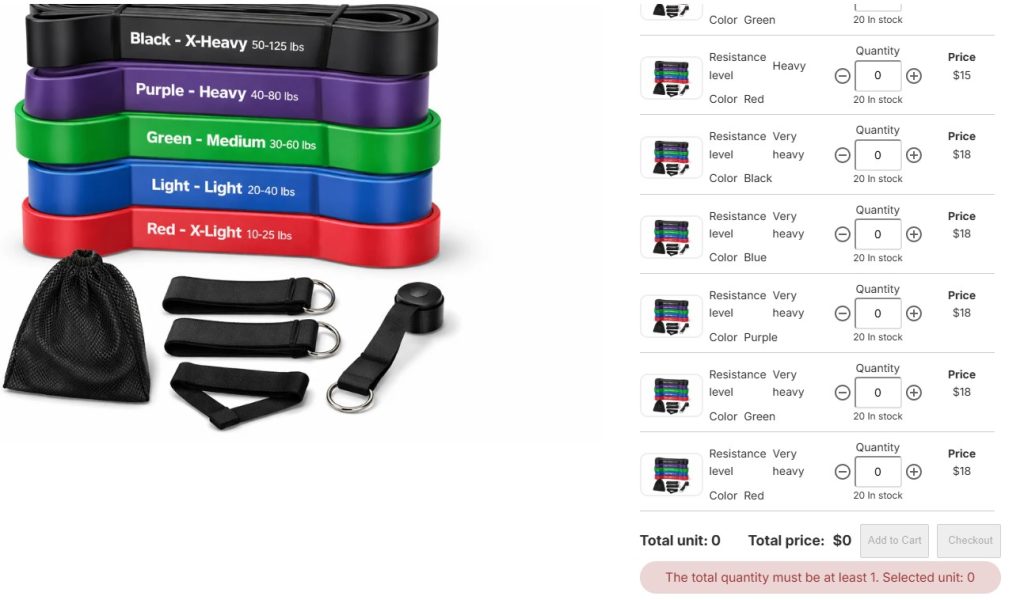
Purpose-built best Shopify bulk order apps approach the problem from the other direction. Instead of the native one-variant-at-a-time flow, they replace the product page ordering interaction with a variant grid or matrix, a single view where buyers can see all variants simultaneously and enter quantities across them in one interaction. Repeat buyers get reorder shortcuts that pull from order history rather than starting from scratch.
Conclusion
Shopify bulk ordering works. It just wasn’t designed with wholesale buyers in mind. The April 2026 update closed a meaningful gap on the pricing and account management side, and that matters. But the ordering experience, how a buyer actually selects variants, enters quantities, and completes a purchase, didn’t change, and for wholesale operations it remains the source of the most persistent friction.
The core issues are structural. Dropdown-based variant selection, no native bulk quantity input, and a reorder flow built for retail consumers aren’t problems a merchant can configure away. They reflect the platform’s origins, and understanding that helps merchants make clearer decisions about where to invest.
For wholesale buyers placing regular, multi-variant orders, the gap between what Shopify’s native ordering provides and what they actually need is real. Addressing it means changing the ordering interaction itself, not the pricing behind it.
Shopify Bulk Ordering: FAQ
Does Shopify’s April 2026 B2B update fix bulk ordering?
Not the ordering UX. The update added company profiles, volume pricing, and custom catalogs to all paid plans, but the product page ordering flow, variant selection, quantity input, and checkout, remained unchanged.
Can wholesale buyers reorder easily on Shopify without an app?
No native reorder shortcut exists for wholesale buyers. Each order starts from scratch on the product page, the same flow a first-time retail customer would use.
Why does ordering feel slow when I have products with many variants?
Shopify’s native variant selector handles one variant at a time. Buyers working through a multi-variant order have to select, add to cart, and repeat for each variant individually, which compounds quickly for products with large size or color runs.
Is the bulk ordering friction only relevant for large wholesale operations?
No. The friction shows up as soon as a buyer is ordering more than a handful of variants in a single session. A small wholesale account placing a 30-unit order across three variants will feel it. Scale makes it worse, but size isn’t the threshold.
Do bulk order apps work with Shopify’s native B2B pricing and company profiles?
Most purpose-built bulk order apps are designed to work alongside Shopify’s native B2B features, not replace them. A merchant can use Shopify’s company profiles and volume pricing while an app handles the ordering UX layer on top.