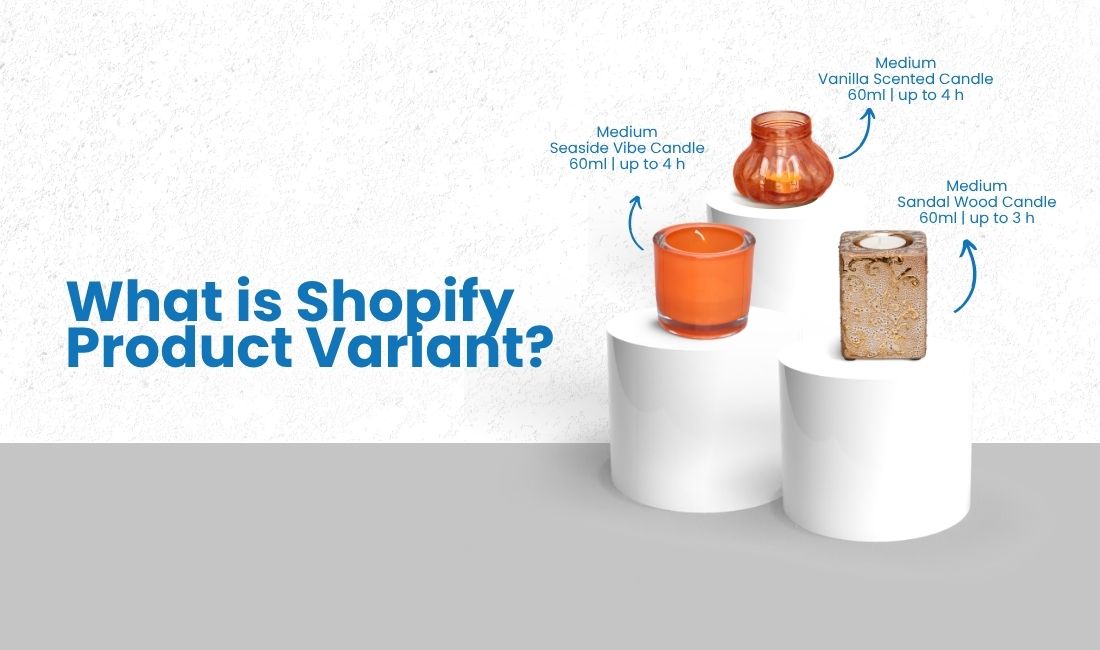
Shopify product variants are the specific, purchasable versions of a product. If you sell ice cream in three flavors and two cup sizes, each flavor-and-size combination (Small Chocolate, Large Vanilla, Medium Strawberry) is a separate variant. Each one can have its own price, its own stock level, and its own product image.
If you’re building out a catalog, or starting to feel like your current setup is working against you, there’s more worth understanding. This post covers how options and variants connect, what each one actually controls, and where Shopify’s native system starts to create real problems as a store grows.
- A Shopify product variant is a specific, purchasable version of a product. A Vanilla flavored, small cup ice-cream is one variant; a Large chocolate flavored ice-cream is another.
- Options define what customers choose (size, color, material); variants are the combinations those choices create.
- Each variant can have its own price, SKU, inventory count, and image. Product options alone can’t do any of that.
- Shopify allows up to 3 options and 2,048 variants per product; most stores never hit this ceiling, but complex catalogs do.
- When the native system isn’t enough, apps like MultiVariants let you add unlimited product options and bulk ordering controls without the workarounds.
Table of Contents
What Are Shopify Product Options?
Product options are the attributes customers choose before buying. Size, color, material: these are options. On their own, they don’t control anything operational. Options don’t track inventory, set prices, or generate SKUs. They’re the inputs.
Shopify lets each product have up to three options. So an ice cream can have Cup Size, Flavor, and Toppings. A fourth option like sauce type or sweetness level isn’t possible natively. For most simple products, three options is more than enough. The limit only starts creating real friction when products are complex or highly configurable.
Options also have values. Cup Size might have the values Small, Medium, and Large. The Flavors might be Vanilla, Chocolate, Strawberry, Mango and Mint. Every combination of those values becomes a variant. The more option values you add, the more variants Shopify generates, and the math compounds quickly. Three options with four values each gives you 64 variants before you’ve added a single product to the cart.
What Are Shopify Product Variants?
Shopify product variants are the actual combinations that come out of your options, the specific versions of a product a customer can buy and you can sell.
Take the Ice-cream example. Two options: Cup Size (Small, Medium, Large) and Flavor (Vanilla, Chocolate). Shopify automatically generates every combination, giving you six variants:
- Small / Vanilla
- Small / Chocolate
- Medium / Vanilla
- Medium / Chocolate
- Large / Vanilla
- Large / Chocolate
Each of those is a distinct product variant. And each one can be configured independently. That’s the key difference between options and variants: options define the choices, variants make them operational.
How to Add Variants in Shopify
Adding variants in Shopify is simple. In your Shopify admin, go to Products, open a product or create a new one, and scroll down to the Variants section. Click Add options like size or color, choose your option name (Size, Color, Material), and add the values below it.
Once you’ve added your options, Shopify generates all possible variant combinations automatically. From there, you can click into each variant individually to set its price, SKU, inventory level, weight, and image.
If you need to update multiple variants at once, say changing the price on all Medium variants, Shopify’s bulk editor lets you do that from the product list without opening each one individually.
What Each Variant Actually Controls
Knowing that variants have SKUs isn’t particularly useful. Understanding why that matters is.
Price. Each variant can have its own price. So if a Large costs more than a Small, or a premium material commands a higher price point, you don’t need separate product listings to handle that. You set the price per variant.
Inventory. Shopify tracks stock at the variant level, not the product level. That means you know exactly when Small / Vanilla is running low, not just that the product is “low stock.” You can set reorder points, track what sells, and avoid overselling a specific size or flavor combination.
SKU and barcode. Each variant gets its own SKU, which is how fulfillment systems, warehouse software, and POS integrations tell products apart. If you’re syncing with any external system, accurate per-variant SKUs are what make that work.
Image. You can assign a specific image to each variant. When a customer picks Vanilla, they see the Vanilla product photo. When they switch to Chocolate, the image updates. It sounds like a small thing, but it removes a real source of customer confusion and return requests.
Weight and shipping. If a larger size or heavier material affects shipping costs, you can set the weight per variant so your shipping rates are calculated correctly.
Where Shopify’s Variant System Has Limits
Most merchants assume the 3-option limit is their main problem. It usually isn’t. The variant count from perfectly legitimate option combinations hits stores long before they ever need a fourth option. A store selling 5 colors, 6 sizes, and 4 materials already has 120 variants on a single product. Add one more color and it becomes 144. Add a fifth material and it’s 180. The ceiling most stores actually bump into isn’t the option count; it’s the unmanageability of the variants those three options generate. The 3-option limit is a secondary problem for most merchants. Variant sprawl is the first one.
Shopify did raise its variant ceiling from 100 to 2,048, a genuine improvement that removed a significant bottleneck for complex catalogs. But two constraints remain.
Shopify raised its variant ceiling from 100 to 2,048 per product on October 15, 2025. It is a genuine improvement that removed a major frustration for merchants with complex catalogs. One caveat worth knowing: Shopify’s Liquid storefront layer was not updated to support 2,048 variants at the same time as the admin-side change, so merchants on Liquid-based themes may still hit display and functionality limits beyond 250 variants. But two constraints remain that trip up a lot of stores.
The 3-option limit. Cup Size, Flavor, and Toppings is your ceiling. The moment a product needs a fourth meaningful attribute like sauce type or sweetness level, or engraving text, the native system can’t handle it cleanly. Merchants end up splitting products, reducing choices, or creating confusing workarounds that make the admin harder to manage and the storefront harder to navigate.
Options vs. inputs. Some product details aren’t really variants at all. An engraved name, an uploaded logo file, a delivery date, a custom message: these are customer inputs, not inventory combinations. Trying to handle them as Shopify variants creates an explosion of SKUs that’s impossible to manage. Shopify’s native setup has no built-in way to collect these kinds of details.
The 2,048 ceiling still bites complex catalogs. A clothing brand with 6 sizes, 10 colors, and 3 fabric options hits 180 variants on a single product. Add one more option and it multiplies. Merchants in print, B2B, and custom manufacturing run into this regularly.
These aren’t complaints about Shopify; it’s a platform built for general use. But knowing where the edges are helps you plan your catalog structure before you’ve built yourself into a corner.
What If You Need More Shopify Product Options or Variants?
When three options aren’t enough, the workarounds merchants typically reach for, splitting products into separate listings, reducing the choices they offer, or stitching together multiple apps, create new problems. Split products confuse customers and fragment your inventory. Fewer choices mean fewer sales. Multiple apps create compatibility headaches.
A product variant app like MultiVariants can solve the issue. Beyond its core bulk ordering and variant display functionality, it now lets merchants add unlimited custom product options beyond Shopify’s 3-option limit. Text fields for engraving, color and image swatches, file upload for customer artwork, date and time selectors, dropdowns, checkboxes: all of it sits inside the same app already handling your variant display and bulk ordering rules.
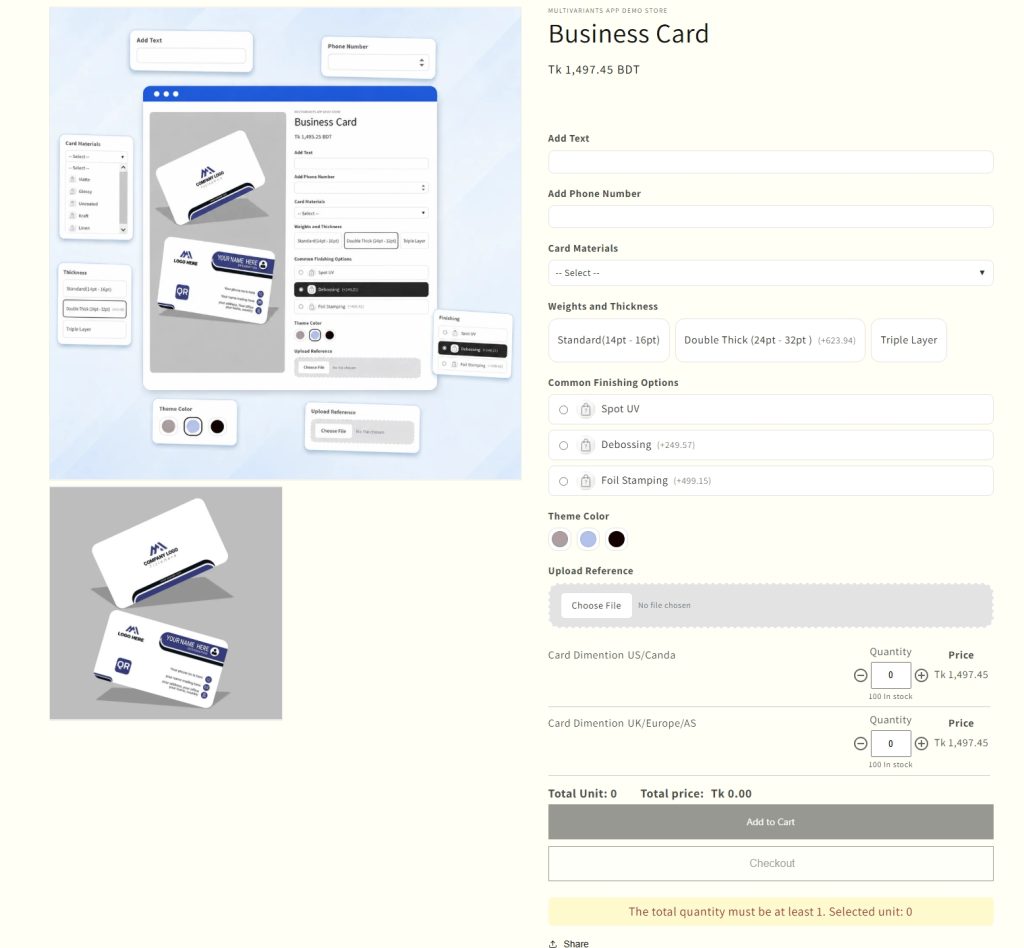
That matters particularly for B2B and wholesale stores, where buyers often need to specify packaging preferences, upload purchase orders, select delivery schedules, or enter custom product requirements, none of which fit neatly into Shopify’s variant structure.
How Shopify Product Variants Affect Your Store Setup
Before building out your catalog, it’s worth thinking through how your products actually work, because the right structure depends on what you’re selling. Getting this wrong early means rebuilding later, and that’s a much bigger job once products are live and orders are coming in.
A few questions worth asking:
Do different versions need separate inventory tracking? If yes, variants are the right structure. Each combination gets its own stock count and you’ll always know what’s available.
Do prices vary across versions? A different price per size, material, or configuration is handled cleanly at the variant level. Options alone can’t do this.
Do you need different images per selection? Variant-specific images are a native Shopify feature. If product photos need to update based on what a customer selects, variants are the right tool.
Do you need to collect customer input that isn’t an inventory combination? An engraved message, a custom measurement, an uploaded file: these aren’t variants. They’re product options, and they’re better handled with the best Shopify product variant apps built for that purpose.
Getting this right at the start saves significant time later. Merchants who set up complex products as variants when they should have used custom options, or vice versa, often find themselves rebuilding their catalog structure as the store grows. A little clarity up front prevents a lot of rework down the line.
Conclusion
Options define what customers choose. Shopify product variants make those choices purchasable, trackable, and operational. For most Shopify stores, the native system handles this well. Where it doesn’t, complex catalogs, custom product inputs, bulk ordering, B2B configurations, the right app closes the gap without creating more problems than it solves. The key is understanding which limitation you’re actually hitting before you go looking for a fix.
FAQ
What’s the difference between a Shopify product option and a variant?
Options are the attributes customers select: Size, Color, Material. Variants are the combinations those options create: Small/Blue, Large/Red. Options define the choices; variants are what actually gets sold, tracked, and fulfilled.
How many variants can a Shopify product have?
Shopify currently allows up to 2,048 variants per product. This applies across all plans. The limit was raised from 100 on October 15, 2025, which removed a significant bottleneck for merchants with complex catalogs.
Can I give different prices to different variants?
Yes. Each Shopify product variant can have its own price. So a Large can cost more than a Small, or a premium material can carry a higher price point, without needing separate product listings.
What happens when I hit Shopify’s variant limit?
You can’t add more variants to that product natively. Common workarounds include splitting the product into multiple listings or using an app that lets you add product options beyond Shopify’s native structure, which avoids the variant explosion entirely for inputs that don’t need inventory tracking.
Do I need a Shopify app to add more than 3 product options?
Yes. Shopify’s native setup is capped at 3 option types per product. If your products need a fourth option, or you need to collect customer inputs like text, file uploads, or dates, you’ll need an app. MultiVariants’ Product Options feature handles this without requiring a separate tool.