A Shopify order limit app is a third-party app that gives you granular control over purchase quantities; either a minimum, a maximum, or both. You set the rules and the app enforces them automatically at the product, variant, or cart level, without any code. It’s the fix merchants turn to when Shopify’s default quantity selector, which lets anyone buy any amount they want, stops working for their business.
In this blog, we’re going to explain what a Shopify order limit app is and whether your store actually needs it or not.
Table of Contents
What Shopify Does By Default And Why It Becomes a Problem
Shopify’s default quantity selector is simple. A customer picks a product, chooses how many they want, and checks out. There’s no minimum. No maximum. No rules around pack sizes or order increments. Anyone can buy any quantity they want.
For a standard retail store, that’s completely fine.
But the moment your store has wholesale buyers, case pack requirements, or B2B customers with minimum order agreements, that open system starts working against you. A wholesale buyer can place an order for 2 units at a price that only makes sense at 24. A retailer can bypass your minimum order value entirely. Someone can order 7 units of a product that only ships in multiples of 6. And Shopify, by default, lets all of it through without a single warning.
You find out after the order is placed. Then you’re stuck; either fulfilling an order that loses you money, or cancelling it and dealing with the fallout.
That’s the core problem. Not a Shopify flaw exactly. Just a system built for retail, being used for something more complex.
What Shopify’s Native B2B Update Covers And Where It Stops
In April 2026, Shopify extended its native B2B features to all paid plans; not just Shopify Plus. Merchants on Basic, Grow, and Advanced plans can now create company profiles for wholesale buyers, set up to three custom pricing catalogs, and apply quantity rules and volume pricing within those catalogs.
For a simple wholesale setup, a handful of accounts, one or two pricing tiers, buyers who always log in through a company profile, this genuinely covers the basics. It’s a real improvement and worth knowing about.
But the coverage has clear limits.
Native quantity rules only apply inside company profiles and their assigned catalogs. Any customer shopping outside of a company profile, a retail buyer, an untagged wholesale contact, or anyone who just lands on your store, sees no quantity restrictions at all. The rules simply don’t apply to them.
Beyond that, non-Plus plans are capped at three catalogs. If your wholesale operation has more than three pricing tiers, you’ve already outgrown the native stack. And cart-level quantity rules, purchase increment enforcement, and per-variant limits outside of catalog structures aren’t part of the native setup at any plan below Plus.
So for stores running both retail and wholesale from the same storefront or any B2B operation with more than basic pricing needs; the native tools get you partway there. The rest still need an app.
What Does a Shopify Order Limit App Actually Do?
By default, Shopify doesn’t care how many units someone adds to their cart. A customer can buy 1 unit or 500. That’s fine for a lot of stores. But once your business has specific quantity requirements, minimum order sizes, case pack rules, per-customer caps, that open door becomes a real operational problem.
A Shopify order limit app closes that door, on your terms.
Here’s what it actually handles:
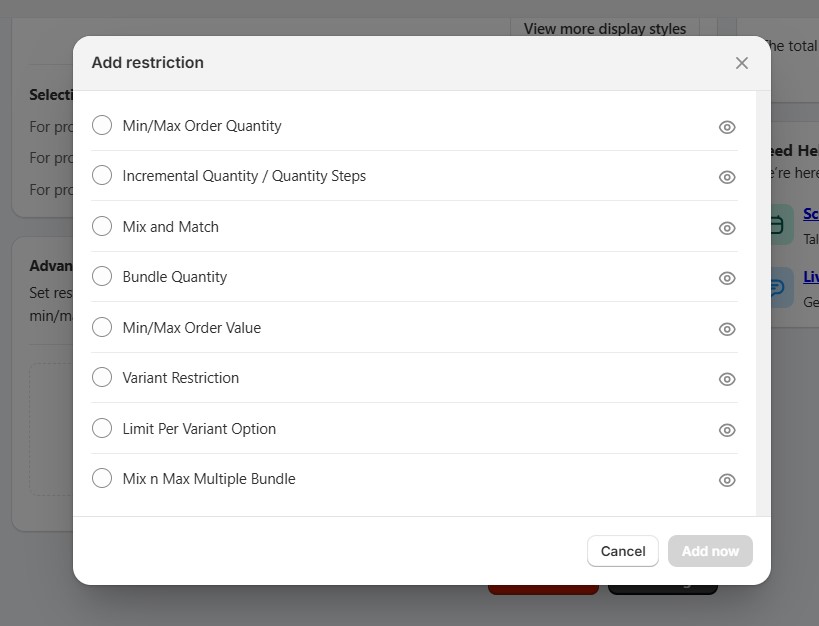
Minimum order quantities (MOQ) You can require buyers to purchase at least a set number of units before checkout goes through. Say you’re a skincare brand selling to salons and spas. You need each order to be at least 6 units per product; anything less doesn’t make sense for your fulfillment cost. Without an app, a buyer can check out with 1 unit and you have no way to stop it. With an order limit app, the checkout is blocked until the minimum is met. The buyer sees a clear message telling them exactly what they need to change.
Maximum order quantities You can cap how many units a single customer can buy per order. This matters most when you’re running a limited product line or selling items with tight stock. If one buyer can purchase your entire available inventory in a single order, that’s a stock management problem and a customer experience problem for everyone else.
Quantity increments You can require orders in specific multiples. If you sell candles in cases of 12, or clothing in size runs of 6, your buyers need to order in those increments. Partial orders break your packaging, your shipping costs, and sometimes your supplier agreements. An order limit app enforces the multiples automatically. A buyer trying to order 7 units of something that ships in 6s gets bumped up to 12 or blocked, depending on how you configure it.
Per-variant rules This is where it gets genuinely useful for stores with complex catalogs. You can set different limits for different variants of the same product. Minimum 12 units for Size S, minimum 6 for Size XL or different case pack sizes for different colorways. Each variant gets its own rule. That level of control doesn’t exist anywhere in Shopify natively.
Rules by customer type Most order limit apps let you apply rules based on customer tags. Your wholesale buyers see one set of rules. Your retail customers see another. Same store, same products, completely different purchase experience for each group; all managed from one place, without building a separate wholesale storefront.
All of this runs automatically once it’s set up. No manual order checking. No back-and-forth emails telling buyers their order doesn’t meet your minimums. The rules just work, every time, at checkout.
Do You Actually Need a Shopify Order Limit App?
Honestly, not every store does. But if any of the scenarios below sound familiar, you probably do.
You run wholesale or B2B and need minimum order quantities enforced at checkout. This is the most common reason merchants look for an order limit app. You sell to retailers, trade buyers, or business customers who need to order in minimums, 6 units per SKU, a $300 cart minimum, or a specific case pack size. The problem is Shopify’s native checkout won’t enforce those minimums unless your buyer is logged into a company profile. If they’re not, or if your store also serves retail customers, there’s nothing stopping a buyer from checking out with 1 unit at wholesale pricing. An order limit app closes that gap for every customer, regardless of how they’re shopping.
Your products ship or sell in specific pack sizes. This one is straightforward but often overlooked until it creates a mess. You sell tiles in boxes of 10, supplements in packs of 6, or t-shirts in size assortments. Your pricing, your supplier agreements, and your warehouse operations are all built around those pack sizes. A buyer ordering 7 units of something that ships in 10s creates a fulfillment problem you have to handle manually. An order limit app enforces the increments at the product or variant level, so only valid quantities ever reach your order management system.
You serve both retail and wholesale customers from the same store. This is where things get complicated fast and where Shopify’s native B2B features have the most limitations. Your retail buyers should be able to purchase any quantity they want. Your wholesale buyers need to meet minimums per SKU. Your distributor accounts might need to order in larger case packs still. Managing different quantity rules for different customer groups, from the same storefront, without an app is either a developer project or it simply isn’t possible. A good order limit app handles it using customer tags each customer group gets its own rules, applied automatically at checkout.
You have a large catalog with different quantity rules per variant. If you have dozens or hundreds of SKUs with different pack sizes and minimum requirements, you can’t manage that manually. An order limit app lets you set rules by collection, product tag, or individual variant; in bulk, without code. When your catalog changes, you update the rules in the app. That’s it.
You probably don’t need one if: Your store sells direct to individual consumers, all products are sold as single units, and you have no wholesale channel, no case pack requirements, and no reason to restrict or require specific purchase quantities. For a standard DTC store with no quantity complexity, Shopify’s default behavior works fine and an order limit app would just be an extra cost with no real benefit.
What to Look for in a Shopify Order Limit App
There’s a lot to weigh when picking the right one. Here’s a full breakdown if you want to go deeper before deciding. But a few things are worth checking quickly before you install anything.
Variant-level control. Not just product-level. If you sell multiple variants with different quantity requirements, you need an app that handles rules at the variant level.
Customer tag support. This lets you apply different rules to different customer groups, wholesale vs retail, without splitting your store or building a separate wholesale site.
B2B catalog compatibility. If you’re using Shopify’s native B2B catalogs, make sure the app works alongside them. Not all do.
No-code setup. You shouldn’t need a developer to set basic quantity rules. If an app requires custom code for standard use cases, that’s worth knowing upfront.
Ready to Find the Right App?
Now that you know what a Shopify order limit app does and whether your store actually needs one, the next step is picking the right one for your setup.
Not all order limit apps are built the same, especially for B2B and wholesale use cases. Some handle simple min/max rules well. Others fall short the moment your catalog gets complex. Check out our breakdown of the best Shopify order limit apps to see which ones actually hold up for stores with real wholesale complexity.
Shopify Order Limit App: FAQ
What is a Shopify order limit app?
A Shopify order limit app lets you control how many units a customer can buy. You can set minimums, maximums, or both, at the product, variant, or cart level. The app enforces the rules automatically at checkout, without any code.
Do I need an order limit app for Shopify?
It depends on your store. If you sell wholesale, have minimum order requirements, sell in case packs, or serve both retail and B2B customers from the same store, you likely need one. If you’re a standard DTC store selling single units with no quantity rules, you probably don’t.
How do I set a minimum order quantity on Shopify?
Shopify doesn’t have a native minimum order quantity feature for general customers. For B2B buyers with company profiles, you can set quantity rules inside your catalog. For everyone else, you need a third-party order limit app to enforce minimums at checkout.
Can Shopify limit how many a customer can buy?
Not natively, at least not for general retail customers. Shopify’s native quantity rules only apply within B2B company profiles. For broader purchase limits across all customers, you need a Shopify order limit app.
Does Shopify have a built-in order limit feature?
Partially. Since April 2026, Shopify includes native quantity rules for B2B buyers on all paid plans. But these only work within company profiles and catalogs. There’s no built-in way to set order limits for regular retail customers without an app.
Can I set different order limits for wholesale and retail customers?
Yes. You need an order limit app to do it. Most apps support customer tag-based rules, meaning your wholesale buyers see one set of limits and your retail customers see another. All from the same store, no duplicate setup required.