Every June 21, International Day of Yoga reminds millions of people to slow down, find their footing, and move with intention. For merchants selling yoga products on Shopify, it’s worth asking whether your store offers that same experience to the people buying from you.
Not in a philosophical sense. In a practical one.
If your customers need to buy a yoga mat in three colorways, a set of leggings in four sizes, or a mixed kit of blocks and straps for a studio group, what does that process actually look like on your product page? If the answer involves selecting one variant, adding to cart, going back, selecting another variant, and repeating that loop until the order is done, the experience has already lost its flow before the customer reaches checkout.
This blog explores this ordering gap.
Table of Contents
What Yoga Teaches Us About the Buying Experience
Yoga, at its core, is about removing what gets in the way. Unnecessary tension, unnecessary movement, unnecessary complexity. What’s left is something that feels easy, even when it isn’t.
A well-designed buying experience works the same way. The customer knows what they want. The store’s job is to make the path from “I want this” to “I’ve ordered this” as clean and unobstructed as possible. Every extra step, every unnecessary click, every moment where the customer has to backtrack and start again is the ecommerce equivalent of a misaligned pose. It interrupts the flow.
For merchants selling yoga products on Shopify, this isn’t abstract. It shows up directly in how your product pages handle variant selection.
Who Actually Buys Yoga Products on Shopify
Before fixing the experience, it helps to know who you’re fixing it for.
There are two types of buyers most yoga merchants deal with regularly, and they have very different needs when they land on a product page.
The first is the individual shopper. They want one mat, one pair of leggings, one top. They pick a size, pick a color, add to cart. The standard Shopify product page, which displays variants through dropdown selectors one combination at a time, works reasonably well for this person.
The second is the bulk or studio buyer. A yoga instructor ordering apparel for a retreat group. A studio manager stocking up on mats and blocks for a new term. A wellness retailer putting together a mixed accessory order. These buyers don’t want one variant. They want several, often across sizes and colors, often in specific quantities. For them, the default experience starts to break down quickly.
If your store serves any version of that second buyer, the ordering experience deserves a closer look.
Where the Friction Actually Lives
Here’s what the standard experience looks like for a studio buyer ordering yoga apparel in multiple sizes.
They land on the product page for your best-selling leggings. They select size small, quantity two, add to cart. They navigate back to the product page. They select size medium, quantity three, add to cart. They go back again. Size large, quantity two, add to cart. That’s three separate trips through the same page for one product, and they haven’t even started on a second item.
For a customer ordering a straightforward single item, this isn’t a problem. For someone placing a mixed-size order for a group, it’s tedious enough to make them consider messaging you directly instead of checking out, or worse, abandoning the order entirely.
The friction isn’t a flaw in your store design. It’s a limitation of how the default product page handles variant selection on Shopify, which was built around individual purchases, not multi-variant bulk ordering. Recognizing that distinction is the first step toward fixing it.
Shopify Variant Ordering for Yoga Stores: What a Smoother Setup Looks Like
Better Shopify variant ordering for yoga stores doesn’t require rebuilding your store. It requires giving customers a different way to interact with your product page.
Instead of dropdown selectors that show one variant combination at a time, a variant table lays out all available sizes and colors together, with a quantity field next to each one. The customer can see everything at once, enter the quantities they need across multiple variants, and add the entire order to cart in a single action.
For a yoga apparel store, that means a studio buyer can select two smalls, three mediums, and two larges of the same legging in one view, in under a minute, without navigating back and forth.
For a wellness accessories merchant, it means a retreat organizer can move through mixed accessory orders with less manual work and fewer support emails.
A Shopify bulk order app like MultiVariants can turn the product page into a cleaner multi-variant ordering experience. This is what MultiVariants adds to a Shopify product page:
- A bulk order form that works with most Shopify themes without requiring custom code
- Lets customers place multi-variant orders the way they actually want to place them.
- It also lets merchants set minimum and maximum quantities per variant, which is useful for anyone managing wholesale minimums or studio pack sizes.
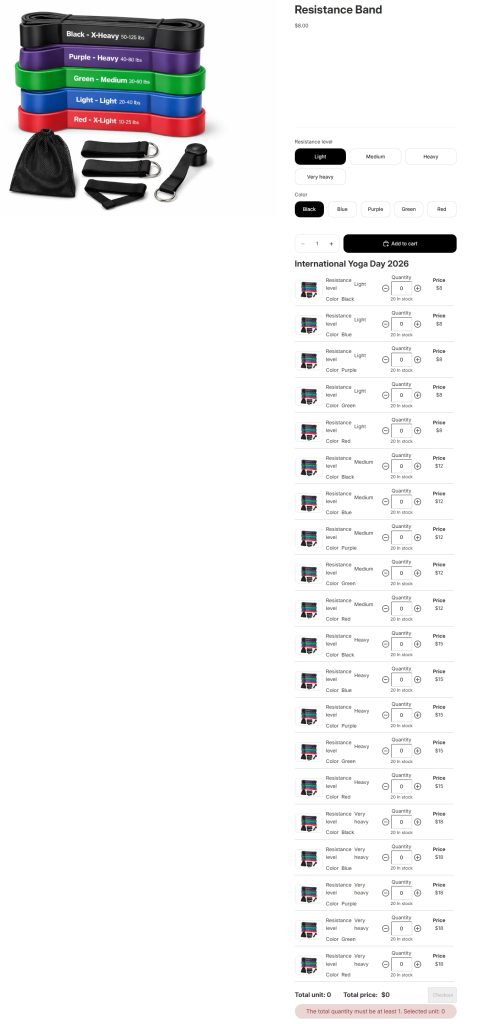
This setup is especially useful for yoga apparel stores, studio supply stores, wellness accessory brands, retreat organizers, and Shopify merchants who regularly receive orders across multiple sizes, colors, or pack quantities.
Sell Yoga Apparel on Shopify Without the Back-and-Forth
Apparel is where this problem shows up most clearly, and it’s where the fix makes the most immediate difference.
When you sell yoga apparel on Shopify, your products almost always carry multiple size and color options. A customer buying for themselves might only need one combination. But a yoga teacher buying for a class, a studio owner ordering branded merchandise, or a wholesale buyer stocking a retail shelf needs several combinations at once.
The back-and-forth of selecting one size at a time isn’t just inconvenient for these buyers. It signals that your store wasn’t built for them. And if your store wasn’t built for them, they’ll find one that was.
A variant table changes that signal entirely. It tells the bulk buyer that you understand how they shop. Sizes and colors are visible together. Quantities are entered in one place. The order goes in cleanly, and the customer moves on. That’s the experience that earns repeat business from studio buyers and wholesale accounts, and it’s entirely achievable for any merchant who sells yoga apparel on Shopify.
International Day of Yoga as a Store Audit Prompt
Yoga merchants tend to think about International Day of Yoga as a marketing moment, and it is. It’s a natural occasion to promote products, run studio-focused campaigns, and reach instructors and wellness retailers who are already in a buying mindset around June 21.
But a campaign only performs as well as the page it sends traffic to.
If you’re planning promotions around International Day of Yoga and your product pages still rely on one-variant-at-a-time selection, the campaign will bring visitors that your store isn’t fully set up to convert. Studio buyers and bulk purchasers who arrive ready to order will hit the same friction they always do, and your campaign results will reflect that.
The day is a useful prompt. Before you send the email or post the offer, spend ten minutes ordering from your own store the way a studio buyer would. Select multiple sizes. Try to order a mixed-color kit. Count the steps. If the experience feels slow and repetitive, that’s the thing worth fixing before June 21.
Conclusion
Flow, flexibility, and simplicity aren’t just principles for the mat. They’re the standard a product page should meet for anyone selling yoga products on Shopify.
Individual shoppers buying a single mat or one pair of leggings will get through most product pages without much friction. But studio buyers ordering mixed sizes for a group, instructors putting together retreat kits, and wellness retailers stocking accessories in bulk will feel every unnecessary step. Those are the customers most likely to abandon an order or reach out manually instead of checking out, and they’re often your highest-value buyers.
Better Shopify variant ordering doesn’t require a rebuild. A variant table that shows all sizes and colors together, with quantity fields per variant, solves the problem directly. For merchants who sell yoga apparel on Shopify or supply studios and wellness retailers, that single change can make the difference between an order completed and an order abandoned.
MultiVariants adds that variant table to any Shopify product page, with no code required. If your store serves bulk buyers, studio owners, or anyone ordering more than one variant at a time, it’s worth a look before your next campaign goes out.
FAQ
Can Shopify handle bulk orders for yoga products natively?
Shopify’s default product page displays variants through dropdown selectors, which are designed for selecting one combination at a time. For customers who need to order multiple sizes or colors together, a third-party app like MultiVariants adds a variant table that makes bulk ordering more straightforward.
How do I let customers order multiple sizes of yoga apparel in one go?
A variant table on your product page lets customers see all available sizes and colors at once and enter quantities for each without navigating back and forth. MultiVariants adds this to any Shopify product page without requiring code changes.
Is MultiVariants suitable for small yoga stores or only wholesale?
MultiVariants works for both. Small DTC stores benefit from a cleaner ordering experience for customers buying more than one variant, and wholesale or studio-focused stores benefit from the bulk ordering structure and the ability to set minimum and maximum quantities per variant.
What’s the best way to set up a yoga mat product page with multiple color variants?
A variant table layout works well for products with multiple color options. It displays all colors together with individual quantity fields, so customers can select and order several colorways in a single add-to-cart action rather than repeating the process for each one.

Syeda Rehnoma Tanzom
This article was reviewed by the MultiVariants Technical Support Team, who regularly helps Shopify merchants test bulk ordering setup, variant selection, quantity rules, cart behavior, and checkout validation issues.