
If you sell a serum or tinted moisturizer in multiple shades and you’ve ever watched one buyer clean out an entire variant during a promotion, you already know the problem. Shopify order limits for skincare products work differently than most merchants expect, and closing that gap requires understanding exactly what Shopify handles natively and where it stops.
Shopify does have a native add-to-cart limit, but for regular DTC carts it applies one maximum quantity per item and does not give you customer tag-based storefront rules. Shopify B2B catalogs have separate quantity rules, but those are part of a B2B catalog workflow rather than the general DTC add-to-cart limit. For skincare merchants who need variant quantity limits Shopify doesn’t natively support, including customer-specific rules and custom messaging, a third-party solution fills that gap.
- Shopify’s native add-to-cart limit sets one maximum quantity per item, so the same cap applies to each variant independently, but it doesn’t give skincare merchants customer-specific rules, custom messages, or combined-total controls.
- Skincare stores face this problem more acutely than most because a single product can span dozens of shades, formulations, or skin types, each with its own limited stock.
- MultiVariants lets you set a minimum and maximum order quantity that applies per variant across a product, so every shade is capped at the same rule without requiring custom code.
- Cart alerts, product page messages, and checkout alerts inform buyers of the limit before they hit a wall, which reduces abandonment and confusion.
- Skincare brands selling to both retail customers and salons can use customer tag-based eligibility rules from the Standard plan to apply different quantity limits to different buyer types on the same product.
Table of Contents
Why Skincare Stores Have a Variant Quantity Problem That Other Shops Don’t
Skincare products often carry a kind of variant complexity that makes quantity control especially important. A clothing store selling a basic tee in four colors has a manageable variant range. A skincare brand selling a vitamin C serum across six formulations, normal, oily, sensitive, combination, dry, and acne-prone, already has six distinct variants with six separate stock levels and often six very different demand curves.
Add a shade range to a tinted product and that complexity multiplies fast. A foundation serum covering 20 shades means 20 separate inventory pools, and popular shades in the middle of the range may sell faster than less common shades. When you run a promotion and one buyer orders 10 units of Shade 04 Warm Beige, that single order can take a large share of the available stock before other customers get a chance.
This is the core tension for indie and small-batch skincare brands: limited production runs mean limited per-shade stock, and without variant-level quantity rules, one buyer’s cart can undo a drop you’ve spent weeks preparing.
What Shopify Does Natively (and Where It Stops)
Shopify does offer a native add-to-cart limit. You can find it in your Shopify admin under Settings > Checkout > Advanced Preferences > Add-to-cart limit. When active, it sets a maximum quantity per item, so each variant is treated independently. Understanding how variant quantity limits Shopify applies natively helps clarify the gap: if your cap is 5, a buyer can add up to 5 units of one shade, then up to 5 units of another shade, because each shade is a separate variant.
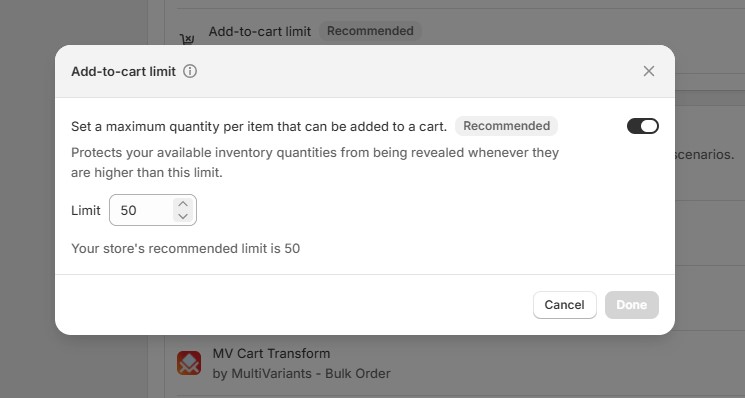
It prevents extreme single-variant quantities, but it does not give DTC skincare merchants the same flexibility as a dedicated order limit app. Shopify’s native setting applies the maximum quantity to each product’s variants independently, not to the product or cart as a whole. A buyer could hit the cap on one shade and still order the maximum quantity of every other shade in the same cart.
Beyond that, the native setting does not provide customer tag-based storefront rules, custom product-page limit messages, live variant-table inventory display, or combined-total controls across variants. Shopify B2B catalogs do support separate quantity rules, but those are part of Shopify’s B2B catalog workflow rather than the general DTC add-to-cart limit.
For skincare stores that need customer-specific rules, custom limit messages, live stock visibility, or more flexible min/max controls,native variant quantity limits Shopify may not be enough. You’ll need the one of the best Shopify order limit apps according to your need.
Setting Shopify Order Limits for Skincare Products
This is where MultiVariants comes in. The app adds a variant table directly to your product page, so buyers can see all shades or formulations at once, input quantities per variant, and see live inventory counts before they add to cart.
On the Professional plan, MultiVariants supports min/max rules per variant or as a combined total, so merchants can control how many units buyers can order across variant-heavy products. The rule applies uniformly across every variant of that product, meaning every shade carries the same cap, but each variant is tracked and enforced individually under that rule.
For a small-batch skincare brand running a limited drop, this means:
- Every shade of your tinted serum has the same per-variant maximum, so no single shade gets cleared out faster than another through bulk ordering.
- Buyers see the quantity input for every variant on one screen, which reduces the back-and-forth of dropdown navigation and makes the purchasing experience cleaner.
- Live inventory tracking inside the variant table shows buyers which shades are running low, so they make informed choices without contacting support.
The app also lets you set a minimum order quantity per variant if your production economics require it. A handmade facial oil that you batch in sets of two, for example, can carry a minimum of 2 per variant so single-unit orders don’t slip through on variants where they’re not profitable.
When You’re Selling to Both Retail Customers and Salons
Skincare brands that sell direct-to-consumer and to salon or spa accounts face a layered version of this problem. A retail customer buying your exfoliating toner for personal use needs a reasonable retail cap. A salon stocking the same toner for client use needs to order in higher quantities to make the purchase worthwhile.
Managing Shopify order limits for skincare products across two buyer types doesn’t require two separate storefronts. MultiVariants handles this through customer eligibility and customer tag-based rules available from the Standard plan. You can assign a tag to your salon accounts, “wholesale” or “salon,” for example, and set different quantity rules that apply only to customers carrying that tag. Retail buyers see the standard max; tagged wholesale buyers see the rules configured for their account type, all on the same product page without maintaining separate storefronts or product listings.
This matters for skincare brands specifically because the product doesn’t change between channels. The formulation a retail customer buys for home use is identical to what a salon orders for professional use. Managing two sets of quantity rules on one product listing, rather than duplicating products across the catalog, keeps your inventory clean and your store manageable.
Keeping Customers Informed When Limits Apply
A quantity limit that surprises a buyer at checkout creates friction. A limit that’s communicated clearly on the product page builds trust, because it signals that the brand is managing stock fairly rather than arbitrarily blocking purchases.
MultiVariants surfaces limit information at three points: on the product page itself, in the cart, and at checkout. You can customize the message at each stage so buyers understand what the limit is and why it exists, using language that fits your brand’s tone. A message like “Each shade is limited to 3 units per order to keep this drop fair for everyone” reads very differently from a generic error. It tells the buyer you’ve thought about them, not just your inventory.
For skincare brands doing limited drops or small-batch launches, that kind of transparency often converts better than no message at all, because buyers who understand the constraint are less likely to abandon the cart out of confusion.
Conclusion
Shopify order limits for skincare products come down to two distinct scenarios, and each calls for a specific approach. If you’re a DTC skincare brand doing limited-batch drops across multiple shades or formulations, you need per-variant max limits that cap every shade at the same quantity so no single variant gets wiped out before other buyers get a chance. If you’re running both retail and salon wholesale from the same storefront, you need customer tag-based rules that apply the right quantities to the right buyer type automatically.
MultiVariants handles this with customer eligibility from the Standard plan and advanced min/max controls on the Professional plan, without requiring custom code or duplicate product listings. The variant table, live inventory display, and configurable alerts make the rules visible to buyers before they reach checkout, which keeps the experience fair and the abandonment rate low.
Shopify Order Limits for Skincare Products: FAQ
Does Shopify have a built-in way to limit orders per variant for skincare products?
Shopify does have a native add-to-cart limit under Settings > Checkout, and it applies per variant independently. It does not support customer tag-based storefront rules, custom limit messages, or combined-total controls across variants, so skincare brands needing more flexibility typically use a third-party app.
What happens if a customer tries to add more than the allowed quantity to their cart?
They simply can’t add those products to the cart. The “add to cart” button will be active only if they meet the conditions. The best part is the restriction is also applied in the checkout page. They can’t add more products in the checkout stage.
Can I set higher limits for wholesale buyers than for retail customers?
Yes. MultiVariants supports customer tag-based eligibility rules from the Standard plan, so you can assign a tag to your salon or wholesale accounts and configure a separate set of quantity rules that applies only to those buyers. Retail customers and wholesale accounts see different limits on the same product page without any duplicate listings.
Do I need to know how to code to set up per-variant order limits on Shopify?
No. MultiVariants is designed for merchants without a development background. The variant table, quantity rules, and customer alerts are all configured through the app dashboard without requiring theme code edits.

Syeda Rehnoma Tanzom
This article was reviewed by the MultiVariants Technical Support Team, who regularly helps Shopify merchants test bulk ordering setup, variant selection, quantity rules, cart behavior, and checkout validation issues.