You search “order limit app” in the Shopify App Store, pick one with decent reviews, install it, and assume you’re done. A week later, you realize it doesn’t support per-variant limits. Or it conflicts with your cart drawer. Or wholesale customers are hitting the same caps as your retail buyers, and they’re not happy about it.
This happens more than it should. Shopify order limit apps look like a simple tool, but the right one for your store depends on factors that aren’t obvious until something goes wrong. Before you install anything, spend five minutes with this checklist. It’ll save you a lot of back-and-forth.
If you’re already browsing options, check out our full breakdown of the best Shopify order limit apps. This post helps you know what to look for before you decide.
What Kind of Limits Do You Actually Need?
This is the first question and most merchants don’t think it through clearly enough.
There are more ways to set an order limit than you might expect. You might need a minimum (customers must buy at least 6 units), a maximum (no more than 2 per customer), or both at the same time. You might need that limit applied at the product level, the variant level (size, color, SKU), or across the entire cart.
Some stores also need time-based limits. For example, a customer can only purchase once per week, or during a flash sale, and each person is capped at 1 item per day. That’s a fundamentally different feature than a simple quantity cap.
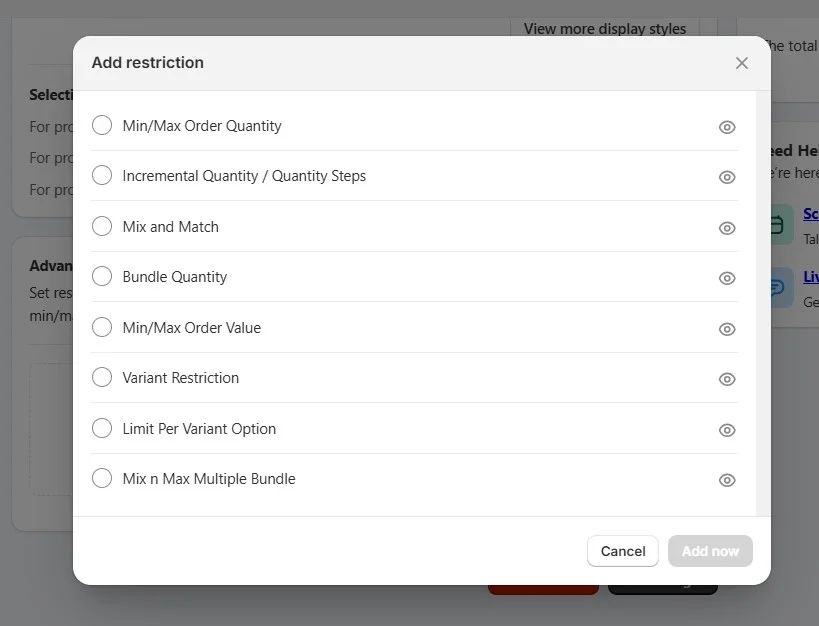
Think through your actual use case before comparing apps. A wholesale store selling industrial supplies needs minimum order quantities per variant to make shipping viable. A limited-edition streetwear brand needs a hard cap of 1 per customer to prevent resellers from clearing stock. These two stores need very different things from the same category of app.
Write down exactly what limit logic you need. Then check whether each app actually supports it, not just mentions it.
What Type of Store Are You Running?
Your business model shapes which features matter most.
B2C stores typically need maximum limits to manage inventory during high-demand periods, prevent bulk buying by resellers, or control fair distribution during launches or promotions.
B2B and wholesale stores are almost the opposite. They usually need minimum order quantities to make fulfillment profitable. Shipping 2 units to a wholesale buyer doesn’t make sense if your minimum viable order is a case of 12.
Hybrid stores, merchants selling both retail and wholesale from the same Shopify store, have the most complex needs. They need both minimums and maximums, and often need those rules to behave differently depending on who’s buying. An app that handles B2C well may fall apart in a wholesale context.
Be honest about which category your store falls into. An app built for DTC flash sales is not the right tool for a wholesale operation, even if it technically has a “minimum order” field somewhere in the settings.
Do You Need Customer-Specific Rules?
Not every customer in your store is the same. So your limits probably shouldn’t be either.
If you sell to both retail and wholesale customers, you may need a setup where wholesale buyers see a minimum of 10 units while retail customers see a maximum of 2. That requires customer segmentation built into the app’s logic, usually through Shopify customer tags or customer groups.
You should also think about how the app handles guest vs. logged-in customers. Some limit enforcement only works when a customer is signed in. If a significant portion of your orders comes from guests, a tag-based system won’t cover them.
Ask yourself: do I need one universal rule, or do I need different rules for different types of buyers?
If the answer is the latter, make sure the app you’re considering actually supports that, not just in theory, but in a way that’s easy to configure and maintain without developer help.
How Does A Shopify Order Limit App Handle Inventory?
There’s a meaningful difference between an app that enforces limits and one that respects live inventory.
A basic order limit app blocks a customer from adding more than X units. However, it doesn’t know or care how many units you actually have in stock. If your inventory drops to 3 and your minimum order is 5, a limit-only app may still let customers attempt to add 5. It will lead to failed orders, overselling, or an awkward customer experience.
A better setup is one where limits are either informed by or coordinated with real stock levels. Some apps integrate directly with Shopify’s inventory data; others work purely on fixed rules.
For stores with tight or fast-moving inventory, seasonal products, limited drops, or made-to-order items, this matters a lot. For stores with stable, deep inventory, a static limit may be perfectly fine. Know which situation you’re in.
Will It Actually Work With Your Store Setup?
A Shopify order limit app can be excellent in isolation and still cause problems in your specific store. Compatibility is one of the most underrated things to check before installing.
Theme compatibility is the most common issue. If you’re running a custom theme or a heavily modified version of a popular theme, some apps inject code that conflicts with your layout or breaks the cart quantity selector. Always check if the app explicitly lists support for your theme or offers a live preview before committing.
Checkout compatibility matters too. With Shopify’s move toward checkout extensibility, apps that relied on older checkout scripts may no longer work as expected. Confirm the app supports the current checkout infrastructure, especially if you’re on Shopify Plus.
Finally, think about your existing app stack. If you’re running a discount app, a bundle app, or a custom cart drawer, test whether the order limit app plays nicely with all of them. Cart behavior is one of the most fragile parts of a Shopify store. A conflict here can silently break your checkout without showing an obvious error.
For instance, Multivariants is built to work alongside Shopify’s native checkout and supports custom themes without requiring code edits. The app is worth checking if your store has a heavily modified setup.
Can You Set It Up Without a Developer?
You shouldn’t need to file a support ticket just to set a minimum order quantity. But some apps are deceptively complex under the hood.
Look for an app with a clean, intuitive admin interface where you can create and edit rules without touching code. Check whether the documentation is clear, not just a list of features, but actual step-by-step guidance for common use cases.
Some apps need code edits or support involvement just to update a rule. That’s a hidden cost most merchants overlook. A low monthly price doesn’t mean much if the app constantly eats into your time.
A well-designed app should take you from install to your first working rule in under 15 minutes.
What Do Real Merchants Say About Support?
Features get merchants in the door. Support keeps them there or drives them away.
Read the Shopify App Store reviews critically. Don’t just look at the star rating. Read the 3-star and 4-star reviews, which tend to be more honest and specific. Look for patterns:
- Are merchants frequently mentioning slow responses?
- Bugs that took weeks to fix?
- Features that work in demos but not in real stores?
Pay particular attention to how the developer responds to negative reviews. A team that engages constructively with criticism, acknowledges issues, and follows up with fixes is worth trusting. A team that goes quiet or gives copy-paste responses is a red flag.
For complex use cases, B2B, custom themes, and high-volume stores, support quality isn’t just a nice-to-have. It’s a core part of the product.
Is the Pricing Actually Worth It?
Most Shopify order limit apps have a free plan, but it’s worth understanding exactly what that includes and what it doesn’t.
Check which features are locked behind paid tiers. Is customer segmentation a paid feature? Are time-based limits only available on the highest plan? If the feature you actually need is on a $30/month plan, factor that into your evaluation from the start.
Also consider how pricing scales. Some apps charge based on the number of active rules, others on order volume, and others on a flat monthly fee. For a growing store, a volume-based pricing model could become expensive fast. A flat fee is more predictable.
The cheapest app isn’t always the best value. If a $15/month app does exactly what you need cleanly and reliably, it’s better than a free app that requires constant workarounds.
Conclusion: Make the Decision With Clarity
Choosing a Shopify order limit app isn’t complicated. However, it does require knowing what you’re actually solving for. The merchants who regret their app choice usually picked one without working through these questions first.
Use this checklist as your filter. Get clear on your limit type, your customer segments, your store setup, and your support expectations before you start comparing options. Once you know what you need, picking the right app becomes straightforward.
Ready to compare specific apps? Check out our full breakdown of the best Shopify order limit apps to find the one that fits your store.
FAQ: Things to Consider Before Choosing A Shopify Order Limit App
Can customers bypass the order limit by going directly to the checkout URL?
Yes, they can. If the app only enforces limits at the cart level. When a customer jumps directly to /checkout, cart-level restrictions get skipped entirely. To prevent this, make sure the app you choose enforces limits at the checkout validation layer, not just on the product page or cart. Apps with a dedicated checkout rule setting handle this properly.
Will an order limit app conflict with my other apps?
It can. Cart drawers, discount apps, and bundle apps are the most frequent sources of conflict. Some apps enforce limits by modifying the cart. If another app also modifies the cart, they can cancel each other out. Before committing, check if the app lists known conflicts, and always test your full cart-to-checkout flow after installing.
Do order limit apps work for both B2B and B2C on the same store?
Not all of them. Some apps only support universal rules. The same limit applies to every customer. If you sell to both retail and wholesale customers from one store, you need an app that supports customer tag-based rules so each group sees different limits. Check for this specifically. It’s often a paid feature, not available on free plans.
Does Shopify have a built-in order limit feature?
Not in any meaningful way. Shopify’s native settings don’t let you set per-product, per-variant, or per-customer limits. There’s a basic order value limit available through Checkout Blocks, but it’s limited in scope.
Why is my order limit showing on the product page but not enforcing at checkout?
This usually means the app is only validating on the frontend, the product page or cart page, but not at checkout. A determined customer (or a savvy one) can work around frontend-only limits. The fix is enabling the app’s checkout validation rule if it has one. If the app doesn’t offer checkout-level enforcement at all, that’s a fundamental limitation worth knowing before you rely on it.