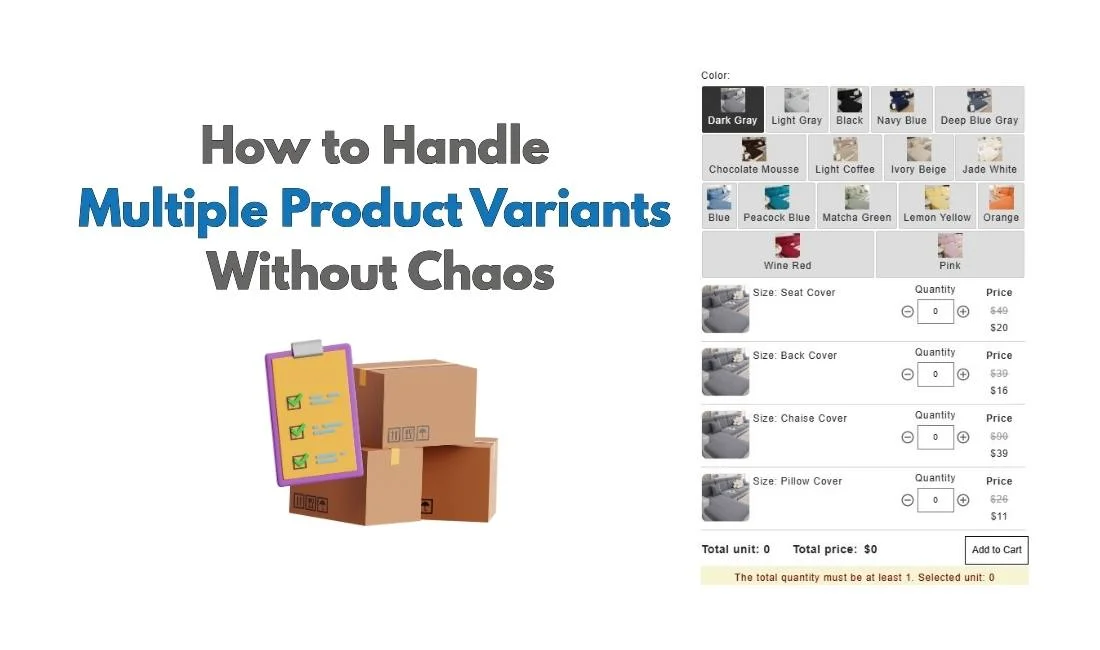
When you first set up their store, adding product variant options may seem like a straightforward task. You add sizes, colors, and materials as options, and it’s easy to manage.
However, problems arise when customers want to order multiple variants at the same time.
For instance, a customer might want to buy 10 small red shirts and 5 large blue ones. Shopify’s default system doesn’t quite seamlessly support this. When customers want to mix and match variants or place bulk orders, the variant management process becomes more complicated and error-prone.
This creates friction for both merchants and customers. Merchants end up juggling multiple line items in their cart, struggling with inventory management, and dealing with a cluttered user interface. Meanwhile, customers face a confusing process that leads to mistakes, frustration, and sometimes even abandoned carts.
So, what’s the solution? We explained everything in this blog!
Summary
Customers often want to buy multiple sizes, colors, and quantities in a single order, but Shopify’s default variant flow forces them to add one variant at a time.
This creates friction through repetitive add-to-cart actions, fragmented carts, and a higher chance of ordering mistakes.
Many merchant workarounds—duplicating products, custom instructions, or complex product setups—add operational complexity without improving the buying experience.
A bulk order form that displays all variants together with quantity inputs creates a faster, clearer ordering experience, especially for B2B, wholesale, and high-volume stores.
How Customers Expect to Order Products with Multiple Variant Options
To understand the issue better, let’s look at it from the customer’s perspective.
When customers shop, they think in quantities and combinations, not in individual variant IDs. If they want 10 red t-shirts in a particular size and 5 blue ones in another, they want to make those selections in one place. They don’t want to go back and forth between options, adding one variant at a time to the cart.
Moreover, customers expect to see a clear total price before they check out. They want to compare options side-by-side, see the total quantity of each item, and get a sense of the overall cost, all in a single, unified view. The reality is that the Shopify bulk order form for handling variants doesn’t meet these needs.
This gap between customer intent and Shopify’s default variant system leads to confusion, frustration, and a suboptimal shopping experience.
Why Shopify’s Default Variant System Breaks for Bulk or Mixed Orders
Shopify’s variant system works well for single product selections, but it wasn’t designed to handle the complexity of multi-variant orders or bulk purchases. Here’s why it breaks down:
One variant per add-to-cart action: Shopify forces customers to select one variant at a time. If a customer wants multiple sizes or colors, they have to repeat the process for each variant. This is cumbersome and time-consuming.
No native way to set quantities per option: Shopify doesn’t allow you to specify the number of items for each variant directly on the product page. You’re left with a cluttered cart, showing different lines for each variant combination.
Cart fills up with fragmented line items: When customers choose more than one variant, they often end up with a messy cart that’s filled with different lines for each combination. This leads to confusion and a less-than-optimal user experience.
Inventory and pricing logic becomes harder to manage: As your product variants grow, managing inventory for each combination becomes increasingly complex. Shopify’s default setup doesn’t make it easy to manage stock levels for multiple variants in a bulk order.
Common Workarounds Merchants Use (And Why They Create More Chaos)
To deal with the limitations of Shopify’s variant system, merchants often turn to workarounds. However, these solutions often create more chaos:
Duplicating products: To offer more options, merchants may create separate product listings for each combination of variants. This results in cluttered catalogs and difficult inventory tracking.
Overloading product descriptions with instructions: Merchants often include detailed instructions in the product description to guide customers through the purchasing process. This can confuse customers, especially those looking for a quick and easy checkout experience.
Manually editing orders after checkout: Some merchants resort to manual order fixes when customers make mistakes in their selections. This adds time, error risk, and stress to the process.
Creating too many variants “just in case”: Now, Shopify 2048 variants are possible. In an attempt to cover all possible combinations, merchants may create excessive variants, adding complexity without solving the core problem.
The Better Mental Model: Ordering Experience Over Variant Structure
So, what’s the solution?
Rather than adding more variants or workarounds, the focus should be on improving the ordering experience itself. You don’t need more options; they need clarity and efficiency.
Instead of forcing customers to pick one variant at a time, we should allow them to:
Select multiple variants in a single view
Specify quantities per variant directly on the product page
Have one consolidated cart showing all selected variants and quantities with a total price, ready for checkout.
The goal isn’t to control every option but to make the ordering process simple and clear for customers, improving their overall shopping experience.
How MultiVariants Solves Variant Chaos Without Changing Your Store Logic
Here’s where MultiVariants, a bulk order app, comes in.
MultiVariants integrates seamlessly with Shopify to manage bulk orders with multiple variants. Importantly, it doesn’t require a complete overhaul of your store or inventory setup. It works with your existing Shopify variants and products, making the ordering process cleaner and simpler for customers.
Layout Display: Showing all the variant options in one product page may seem difficult. However, MultiVariants offers four different layout display – Matrix, Dropdown, List, and Swatch. You can choose what suits your product options the best.
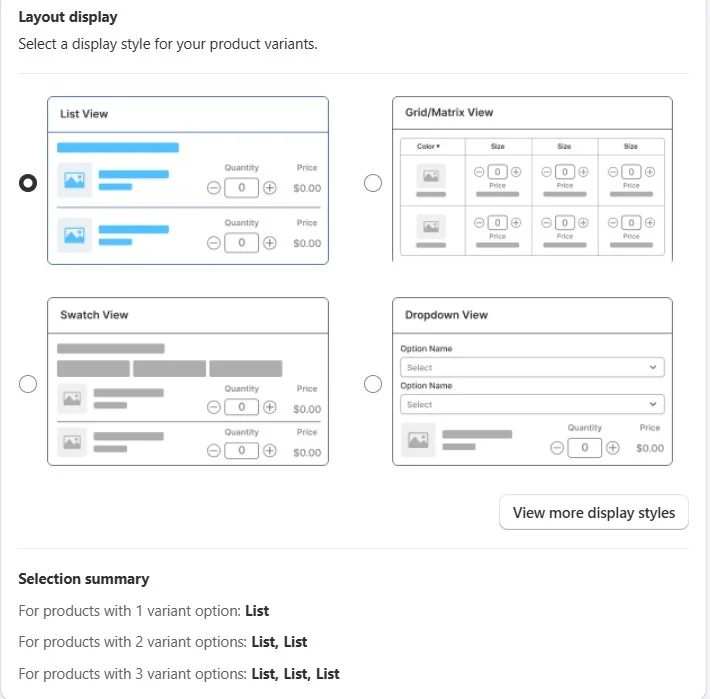
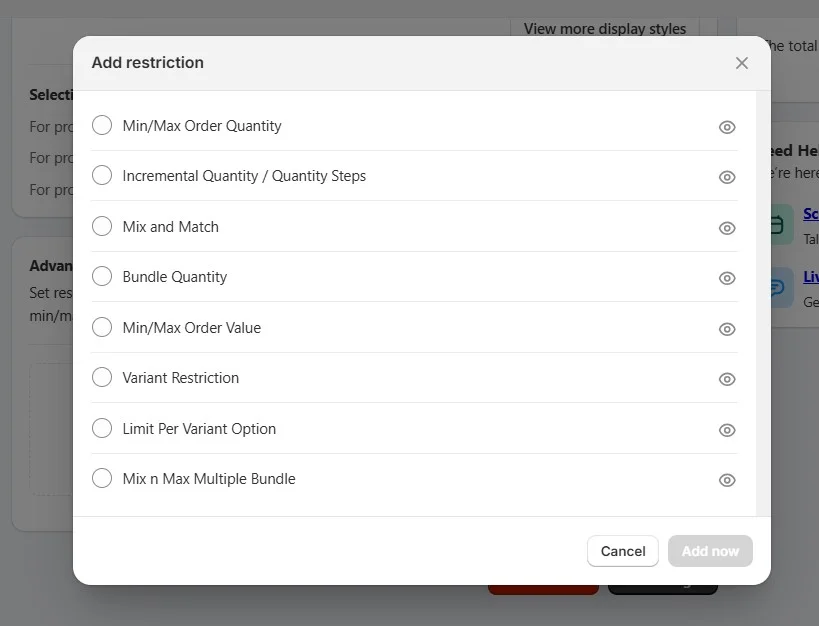
Product and variant restrictions: MultiVariants doesn’t just offer multiple layout displays, so you can display every variant you have in one product page. Now, with this app, you can also set restrictions for your products, including mix-and-match variants, incremental/bundle quantities, min/max variant limits, or per-variant restrictions. Customers can only select valid combinations of variants, reducing order errors and streamlining inventory management. This helps maintain accurate stock levels and improves the overall shopping experience.
What Your Customers Will See
You can see how your customers will experience the product page when multiple variant options are displayed together.
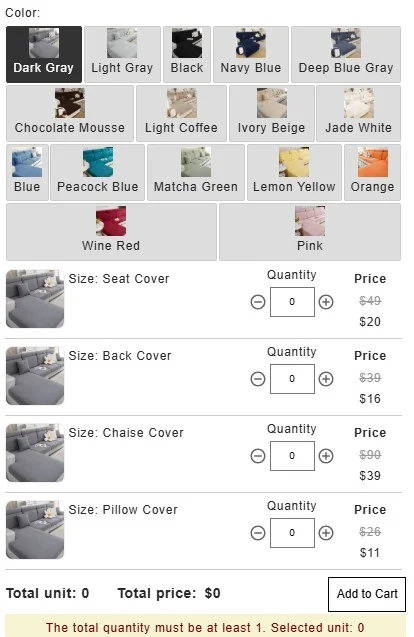
The color options are shown at the top (Grid style). Each product variant, such as Seat Cover, Back Cover, Chaise Cover, and Pillow Cover, has its own quantity selector and price (List view). Customers can easily select the color and size options they prefer for each cover type, all in one place.
This layout allows for a more organized and streamlined shopping experience, making it easier for customers to see and select their preferred combinations without having to navigate through multiple pages.
Benefits of Using a Bulk Order App
Works with existing Shopify variants: No need to create additional product listings or complex configurations.
No inventory duplication: MultiVariants keeps stock levels in sync with the variants you already have, ensuring accurate inventory tracking.
No custom product setup: You don’t need to create special product types to make bulk ordering work.
Orders stay Shopify-native: The entire process remains within the Shopify ecosystem, so you can continue using your existing setup without complications.
What Changes After Implementing a Bulk Variant Ordering Flow
When you implement a bulk variant ordering system, here’s what you’ll see:
Fewer ordering mistakes: Customers can select all their variants and quantities in one place, reducing the chance of errors.
Cleaner carts: The cart now displays all variants and quantities in one line, creating a cleaner and easier-to-manage order.
Clearer inventory tracking: Stock levels remain accurate and automatically update, even when multiple variants are selected in bulk.
Reduced support tickets: With a smoother ordering experience, fewer customers will need assistance, leading to a decrease in support requests.
Why This Matters More for Wholesale, B2B, and High-Quantity Stores
For wholesale and B2B stores, the ability to manage bulk orders and multiple variant options is even more critical. These businesses often deal with large quantities, and manual ordering is not scalable.
Buyers expect spreadsheet-like clarity: Wholesale customers often need to place large orders, requiring a clear, easy-to-navigate order form.
Mixed orders are the norm: B2B buyers don’t just want one product; they want variety within the same order.
Manual ordering instructions don’t scale: As businesses grow, the complexity of manual workarounds becomes unmanageable.
Clean ordering builds trust: When the order process is streamlined and easy, customers feel more confident and are more likely to return.
Final Thought
Shopify is great for simple product orders, but it struggles with real-world ordering behavior, especially when it comes to bulk orders and multi-variant purchases. A bulk order form bridges the gap between Shopify’s current limitations and the real-world needs of your customers.
The goal isn’t complexity. It’s simplicity at scale.
Shopify Multiple Variant Options: FAQ
How to add Shopify options and variants?
Go to your product page in the Shopify admin. Under the “Variants” section, click Add variants. You can then choose option names (like Size or Color), and enter the possible options for each (e.g., Small, Medium, Large for Size, or Red, Blue, Green for Color). Shopify will automatically create a variant for each combination of options.
How many variant options are there in Shopify?
Shopify allows up to 3 options per product (e.g., Size, Color, Material). You can create as many variants as needed by combining different values for each option. Now Shopify allows 2048 variants per product.
What is the difference between options and variants in Shopify?
In Shopify:
Options are the different choices a customer can select (e.g., Size, Color, Material).
Variants are the individual product combinations created from those options (e.g., Small-Red, Medium-Blue, Large-Green).
Options define what customers can choose, and variants are the actual products they can buy based on those choices.
How to customize variants in Shopify?
To customize variants in Shopify, go to your product page in the admin panel. Under the Variants section, you can set different prices, SKU numbers, barcodes, and inventory levels for each variant. You can also upload specific images for each variant (e.g., a different image for a Red Shirt vs. a Blue Shirt) to enhance the shopping experience.