Mix and match bakery bundles sound simple in theory. But for bakery owners like Olivia, they turn into daily chaos. Her inbox is filled with messages like, “Can I get 6 chocolate and 4 vanilla?” or “Do you have a half-dozen mixed box?” Customers want variety. They want to combine flavors and sizes in one order. But her Shopify store only allows them to select one variant at a time. The demand is clearly there. The store just isn’t built to handle it properly.
Mix and match is crucial for a bakery because customers rarely buy just one flavor or one size. Birthdays, office treats, and family gatherings all require variety. When customers can easily build their own mixed boxes, they order more and feel in control. That flexibility directly increases average order value and makes the buying experience smoother.
Shopify’s Default Variant System Wasn’t Built for Bakeries
Shopify’s default variant setup forces customers to select one variant at a time. For many products, that works fine. But for a bakery, it quickly becomes limiting. A customer who wants a mixed dozen cupcakes in three different flavors has no clean way to do that on a single product page. They must add each flavor separately to the cart, adjust quantities multiple times, and hope everything is correct before checkout.
Some bakery owners try workarounds. They create separate listings for every flavor and size combination. Others ask customers to write preferences in the notes field. Some even edit orders manually after purchase. These solutions create confusion, increase the risk of mistakes, and consume valuable time.
The result is predictable. Customers abandon carts. Messages pile up asking for custom combinations. And revenue that could have been captured online slips away.
Mix and Match Bakery Bundles: What Bakery Customers Actually Want
Most bakery customers are not shopping for themselves. They are buying for birthdays, office parties, weddings, baby showers, or holiday gatherings. And in almost every case, they want assortments. One flavor is rarely enough. One size does not fit every guest.
A typical customer might want 6 mini red velvet cupcakes, 4 regular chocolate, and 2 vanilla in a larger size. They expect to select flavors and sizes in one smooth order, not jump back and forth between product pages. They want clarity, control, and a simple way to build their own box.
If your store does not offer that flexibility easily, customers will look for another bakery that does. Convenience often wins over loyalty. That is why mix and match bakery bundles are not just a feature. They become a competitive advantage that helps your store capture event-driven, high-value orders.
How A B2B Wholesale App Solves This
Shopify has some best B2B wholesale apps to use. A BFS bulk order app might be a safe option to choose.
MultiVariants is a Shopify app built specifically for situations like this. Instead of relying on Shopify’s default single-variant dropdown, it replaces it with a clean bulk order form directly on the product page. That means bakery customers no longer have to add one flavor at a time or jump between separate listings.
With MultiVariants, customers can see all available flavors and sizes in one structured table or grid layout. They can enter individual quantities for each combination, for example, 6 mini red velvet, 4 regular chocolate, and 2 vanilla, all before clicking “Add to Cart.” Everything stays organized and clear.
There is no need for custom coding, complicated theme edits, or messy workarounds. You do not have to create separate product listings for every possible combination. The experience stays streamlined for both you and your customers.
MultiVariants also supports minimum order quantity (MOQ) rules. For bakeries that sell by the half-dozen or dozen, you can set rules like “minimum 6 items per bundle” or “must order in multiples of 12.” This ensures operational consistency while still giving customers full flexibility to mix and match flavors and sizes.
Setting It Up: A Bakery Store Walkthrough
Let’s see how to create mix and match bakery bundles on MultiVariants.
- Install MultiVariants on Your Shopify Store
- Name the Ruleset and Select the Product
- Choose the Layout Display
- Add Restrictions
Step#1 Install MultiVariants on Your Shopify Store
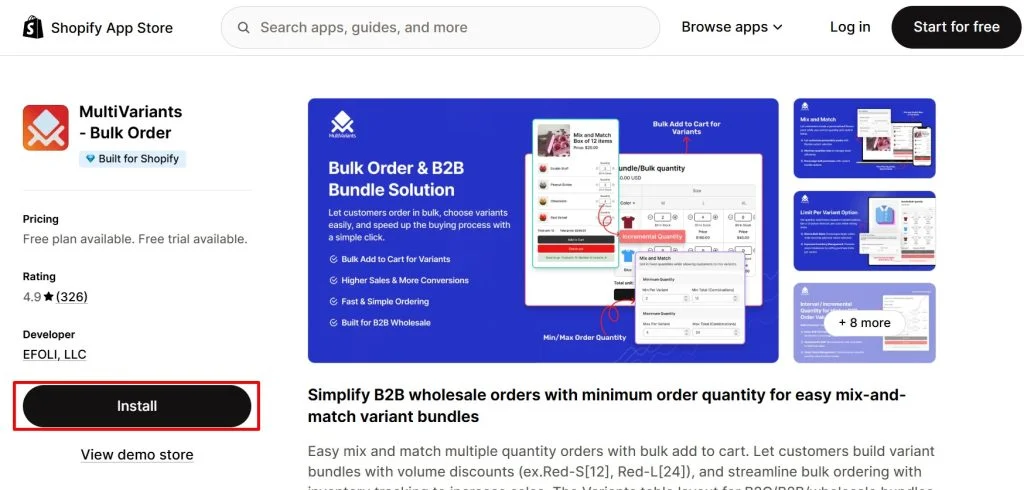
Go to the Shopify App Store and install MultiVariants. Choose the plan that fits your bakery’s needs. Once installed, you’ll be redirected to the app dashboard. From there, you can create a new ruleset to control how your flavor and size options appear on the product page.
Step#2 Name the Ruleset and Select the Product
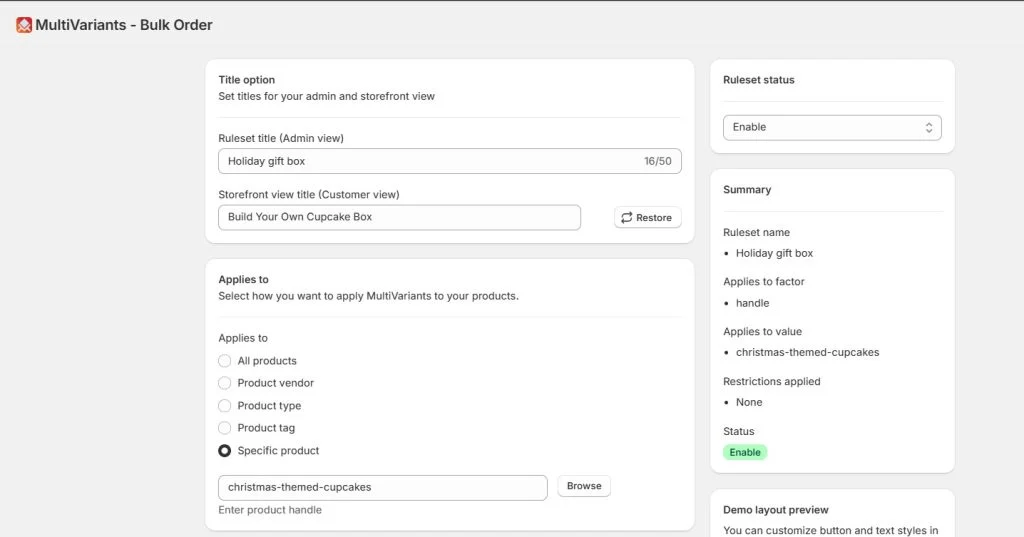
Start by adding a title. This helps you identify the ruleset in your admin. You can also set how the title appears on your storefront, so customers clearly understand what they’re building, for example, “Build Your Own Cupcake Box.”
Next, choose which products the ruleset applies to. MultiVariants allows you to apply it to all products, specific vendors, product types, tags, or individual products. For this example, select a specific product, such as Christmas-themed cupcakes, to enable mix-and-match ordering for that item.
Step#3 Choose the Layout Display
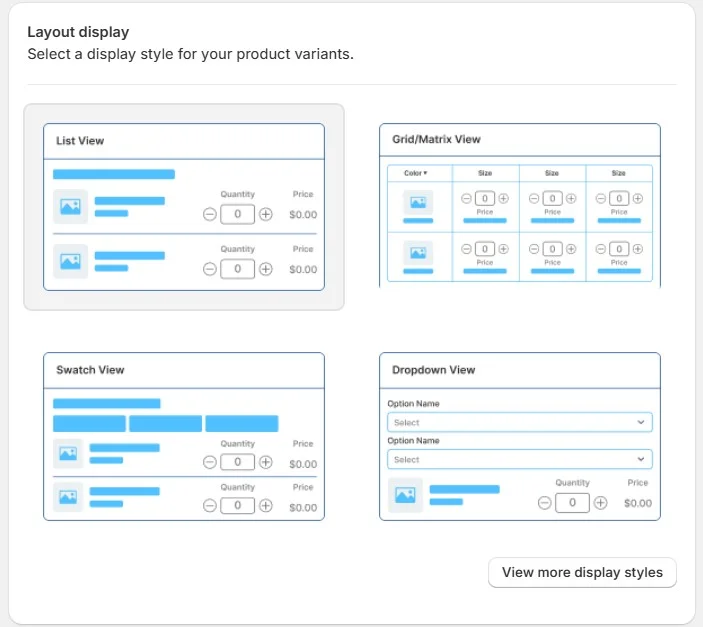
MultiVariants offers four different display layouts. You can choose the one that best fits your store design. Each layout presents flavor and size variants in a clean bulk order format, allowing customers to enter quantities easily. You can also customize how different variant options appear, ensuring the display matches your brand style and improves ordering clarity.
Step#4 Add Restrictions
MultiVariants offers multiple advanced restrictions. For this case we’ll be working with “mix and match” restriction.
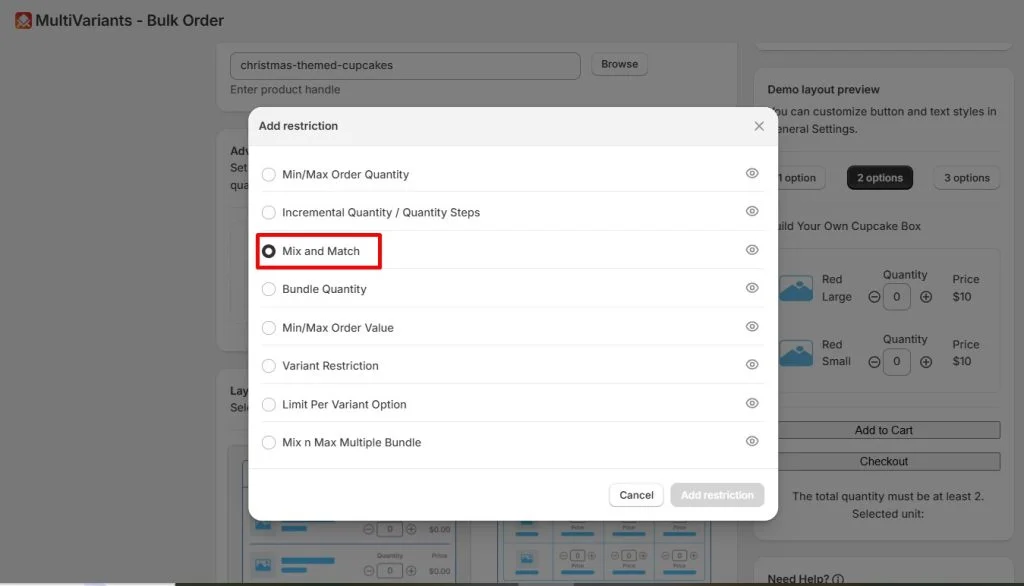
What Your Customers Will See
Now, here is how customers will interact with your mix and match bakery bundles.
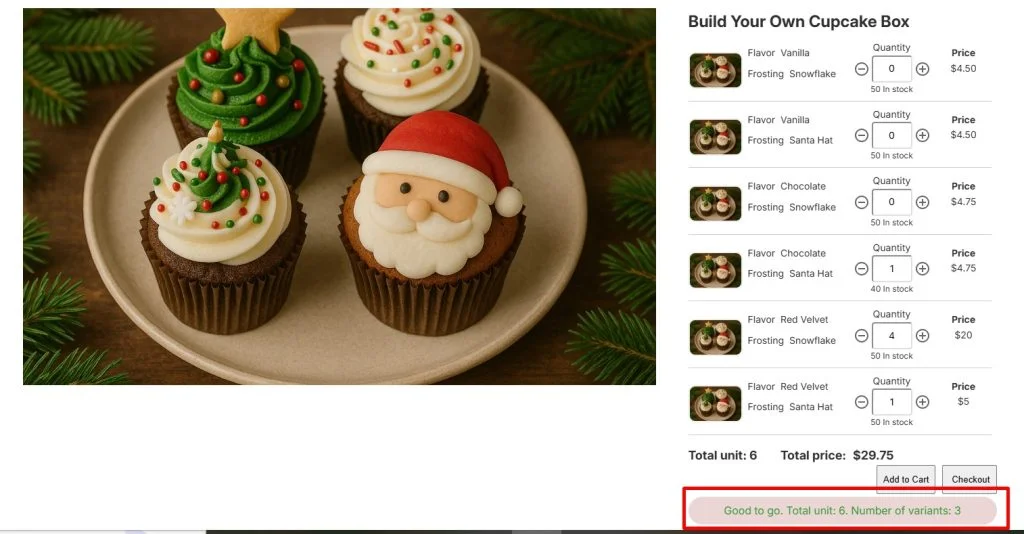
The Add to Cart and Checkout buttons stay disabled until the customer meets the required limit. In this example, the bundle is a box of 6. Customers can choose any combination of variants, as long as the total quantity adds up to 6.
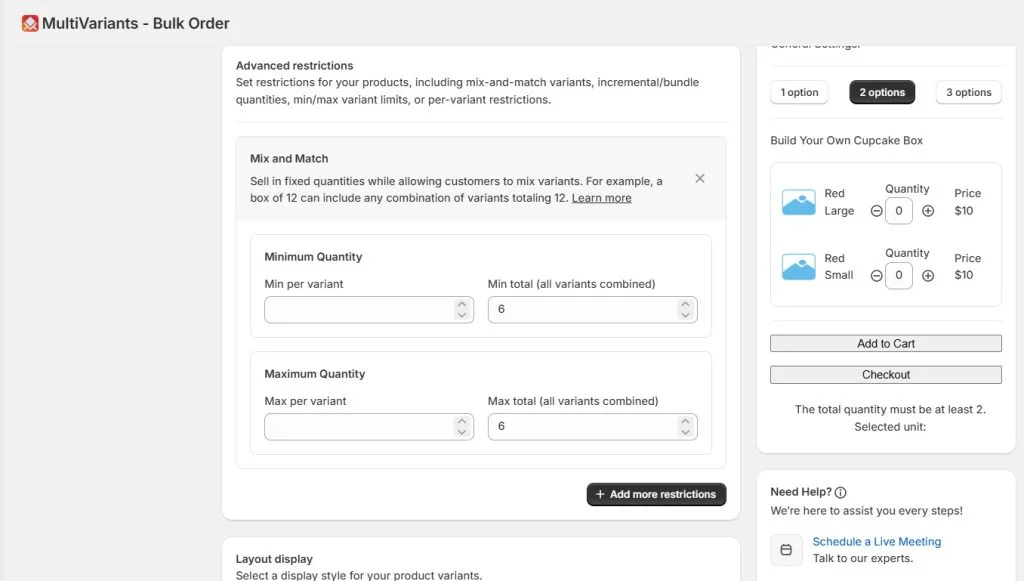
As they select quantities, the bundle total updates in real time. Once they reach exactly 6 cupcakes, they will see a confirmation message like “Good to go,” and both the Add to Cart and Checkout buttons will activate.
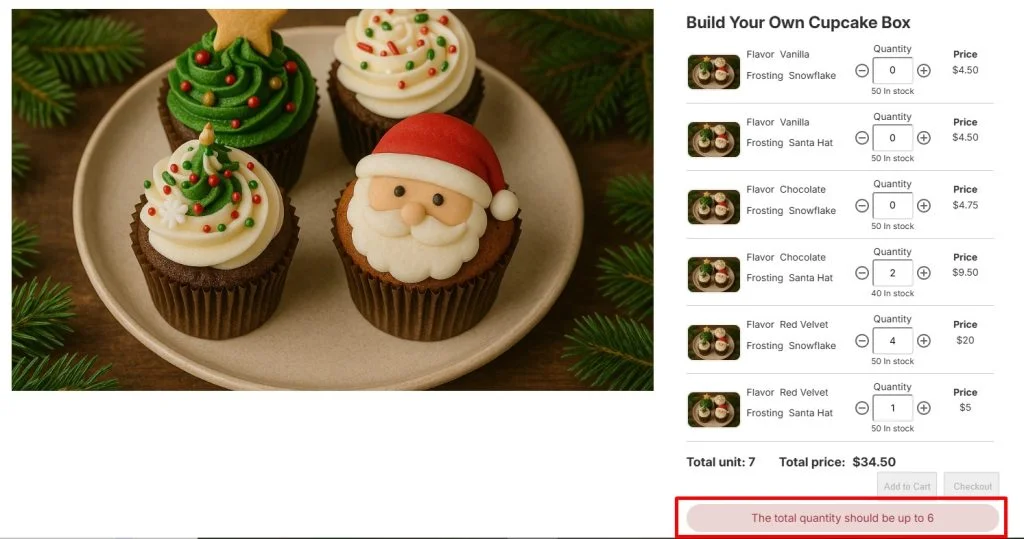
If they select fewer than 6, the buttons remain disabled so they cannot proceed with an incomplete box. If they select more than 6, they will see a warning message telling them they have exceeded the limit and need to adjust their quantities before continuing.
What Changes for the Bakery Owner
Once mix-and-match ordering is handled properly, the difference is immediate. The bakery owner who once answered endless messages like “Can you mix flavors for me?” now receives clean, structured orders directly through the website. There is far less back-and-forth communication and almost no need for manual edits after checkout.
Average order value naturally increases. Customers building bundles tend to order more than those buying a single flavor or size. When shoppers can clearly see all options in one place, they feel encouraged to add “just a few more” to complete a dozen or try an extra flavor.
Event shoppers also enjoy a smoother experience. Whether they are planning a birthday, office gathering, or wedding dessert table, they can customize everything in one session. That convenience builds trust. And when the process feels effortless, they are more likely to return for the next event.
Most importantly, the store begins to look professional and capable of handling bulk or custom orders. Instead of messy DMs and scattered cart items, the bakery owner now manages structured, accurate orders with confidence.
Conclusion
The solution is not complicated. Bakery customers are already asking for flexibility. They want variety, mixed flavors, and different sizes in one order. That is exactly where mix and match bakery bundles make the difference. When your store makes customization simple and structured, sales grow naturally. By enabling mix and match bakery bundles, you align your storefront with real customer behavior instead of forcing customers to adapt to technical limitations. And sometimes, that simple alignment is all it takes to turn demand into consistent revenue.
Mix And Match Bakery Bundles: FAQ
Can customers mix different flavors and sizes in one cupcake box?
Yes. With mix and match bakery bundles, customers can choose multiple flavors and sizes in a single order, as long as they meet the required quantity limit you set.
Can I set a minimum order quantity for bakery bundles?
Yes. You can define rules such as “minimum 6 items” or “must order in multiples of 12.” This ensures customers complete the bundle properly before checking out.
Will this reduce manual order handling?
Absolutely. Structured bundle ordering eliminates the need for back-and-forth messages and manual edits, helping you receive clean, accurate orders directly through your Shopify store.